The ai tools for project management worth using daily are meeting transcription with action items, auto-drafted status summaries, and intake triage agents that set owner, priority and due date. Prediction and auto-planning features stay optional.
Quick steps: what to switch on first
- Turn on meeting transcription for recurring project meetings only — not every call on your calendar.
- Replace your Monday status request with an AI summary of the board, then edit it before anyone reads it.
- Point one intake form at one project and let an agent set owner, priority and due date.
- Log where your AI credits go for two weeks before you buy a bigger plan.
- Keep humans on scoping, estimates and anything a client sees unedited.
Those five moves cover the work that repeats every week in a delivery team: taking requests in, deciding who owns them, and telling everyone else what happened. Each one is reversible in an afternoon if the output disappoints.
What you should not do first is let an assistant generate a whole project plan from a one-line goal. The plan looks plausible, your team quietly rebuilds it, and you have paid credits for a draft nobody kept. Start where the input is already structured — a form, a board, a transcript — because that is where the model has something real to work from.
The rest of this piece walks the same five moves through a launch scenario, the cost mechanics behind them, and a test that tells you whether to keep paying.
What "AI project management" really means in 2026
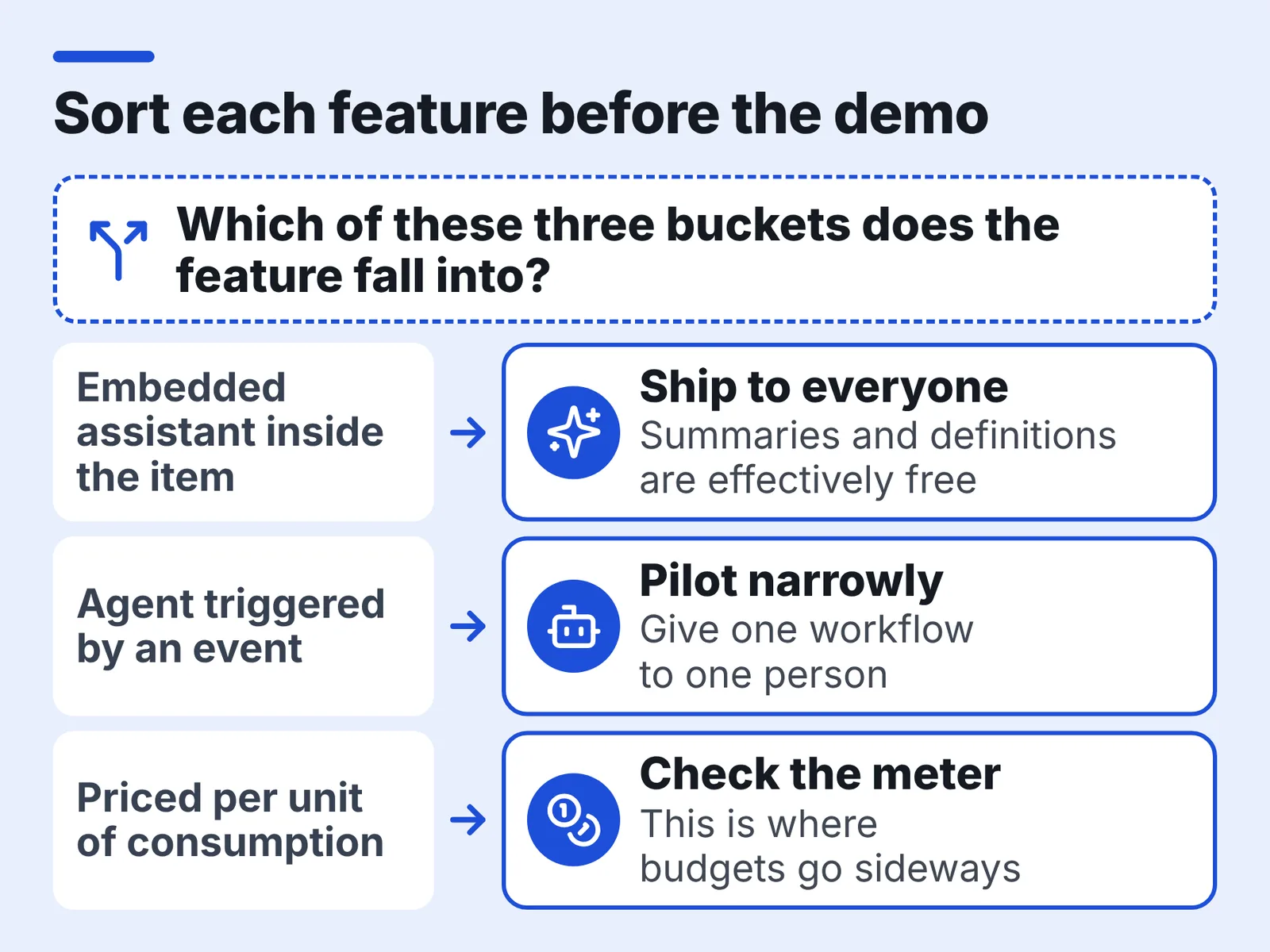
Three different things get sold under one label, and they bill differently:
- Embedded assistants. Summaries, rewrites, definitions and "explain this ticket" buttons that sit inside the item you already opened.
- Agents. Background workers triggered by an event — a form submission, a status change, a new comment — that write fields, route items or post updates.
- Metered platform features. Transcription, bulk generation and workflow runs priced per unit of consumption rather than per seat.
The third category is where budgets go sideways. Atlassian states that Rovo credits are not charged for embedded AI features such as summaries and definitions, which makes the first category effectively free on a paid plan. monday.com’s support centre notes that its credit-based AI pricing model applies to customers who joined on or after May 6, 2026, so two teams on the same product can face different meters.
Ask any vendor rep one question before the demo: which of these three buckets does each feature you are about to show me fall into? The answer changes your rollout order. Free embedded features go to everyone this week; metered agents go to one workflow owned by one person.
The AI features that earn their keep — and three that quietly don’t
Earn their keep:
- Meeting transcription with owner-tagged action items, pushed into the tracker as tasks.
- Board-level summaries you edit before sending, replacing the "any update?" message.
- Intake triage: an agent reading a form response and setting project, owner, priority and due date.
- Search across tickets, docs and threads when someone asks "did we already decide this?"
- Rewriting a messy bug report or request into a clear, testable description.
Three that quietly don’t:
- Full plan generation from a prompt. Dependencies and capacity are the hard part, and the model does not know your designer is on leave.
- Risk and health scoring on thin data. A score built from due-date slippage alone tells you what you already saw on the board.
- Auto-posted status updates with no human edit. One hallucinated "on track" in front of a client costs more than the feature saves.
Cost shapes this list too. monday.com’s support documentation states that each message to monday sidekick costs about 10–30 credits when simple and 150+ credits when extra complex, so chatty exploratory use burns the same budget your triage agent needs. Spend the metered capacity on repeating work, not on conversation.
Example: a nine-person marketing team, six weeks to launch
Example: a nine-person team — demand gen lead, two writers, a designer, a product marketer, a web developer, a lifecycle manager, an events coordinator and the team lead — ships a product launch in six weeks. Requests arrive from sales, support and the founder in Slack DMs, email and hallway conversations.
The team lead spends the first hour of each Monday assembling a status doc from five people’s half-written notes. Two of the six weekly meetings are recorded; nobody rewatches them. By week three, three requests have been worked twice because two writers both claimed them.
None of that is a tooling gap in the usual sense. The board exists and people use it. What breaks is the connective work: turning an unstructured ask into a tracked item, and turning a tracked item back into a sentence a stakeholder understands.
That is the exact seam AI features sit in, which is why a launch is a good first test — short, high-traffic, and finished soon enough to judge honestly. The same pattern shows up in the lean stack a six-person startup team can actually run, where one person owns both intake and reporting.
Before and after: one week of intake, status and notes
| Weekly work | Before | After |
|---|---|---|
| Intake | Requests in DMs, email, hallway; lead retypes them | One form, agent sets owner, priority, due date |
| Duplicate work | Two writers claim the same asset | Agent flags a near-duplicate item at submission |
| Status report | Lead chases five people, writes doc Monday morning | Board summary drafted, lead edits for tone and risk |
| Meeting notes | Recordings nobody opens | Transcript with action items pushed to the board |
| Launch decisions | "Didn’t we agree X?" in Slack | Searchable across tickets, docs and transcripts |
Illustrative example, not measured data — your own figures come from the two-week test below.
The shape of the change matters more than the size. Work moves from recall and retyping toward review and judgement, which is a better use of a team lead on a deadline. You still read every status summary before it leaves the building.
What does not change: scoping, estimates, and the conversation where someone says the date is wrong. Keep those human, and keep them on the calendar. If your notes workflow is the weakest link, the practical setups in this guide to turning recorded video into usable notes go deeper than any tracker’s built-in notetaker does.
The 45-minute setup: form in, triaged project out
Budget 45 minutes and do it once, in this order:
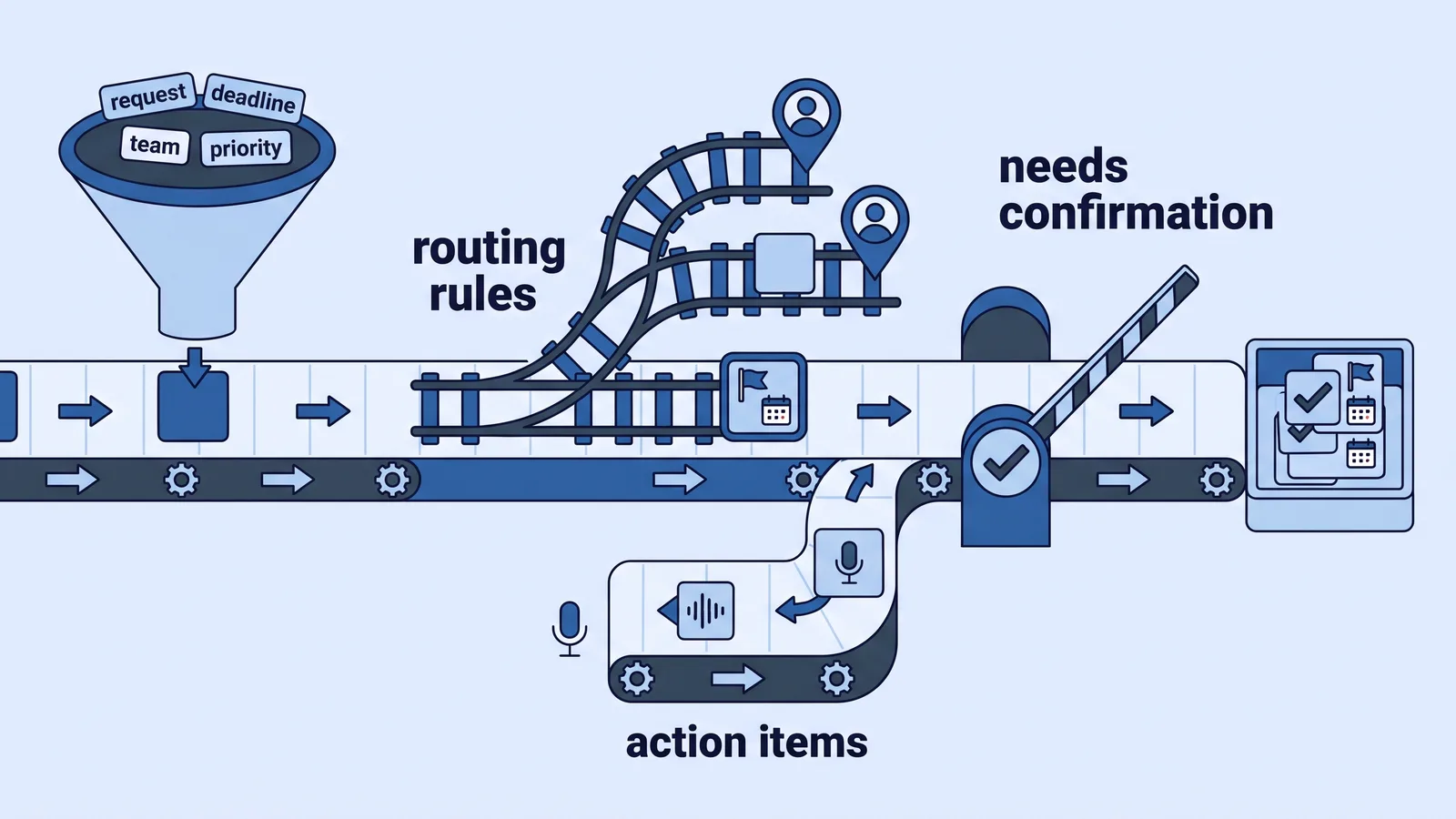
- Minutes 0–10 — build the form. Four fields only: what you need, why it matters, hard deadline, requester team. Free-text descriptions are fine; the model handles those better than your old twelve-field form did.
- Minutes 10–20 — define the routing rules in writing. Which request types go to which owner, what makes something high priority, what the default due date is. Write it as plain sentences; you will paste it into the agent prompt.
- Minutes 20–30 — create the agent. Trigger on form submission. Actions: create item, set owner, set priority, set due date, post a one-line summary in the item.
- Minutes 30–38 — add the review step. Route every agent-created item into a "needs confirmation" column that one person clears daily. Skip this and you will debug a silent misroute three weeks later.
- Minutes 38–45 — connect notes. Enable transcription on the two recurring launch meetings and set action items to create tasks in the same project.
Submit five real past requests through the form yourself before you announce it. Fix the prompt where the owner is wrong, then open it to the team. Storing the routing rules alongside your other working documents keeps them findable — the habits in this walkthrough of AI-assisted knowledge organization apply directly.
What it really costs: credits, caps and overage traps
Seat price is no longer the number that decides this. Consumption is.
monday.com’s support centre states that its AI Notetaker consumes 120 AI credits for every hour of meeting recording, metered in Notetaker minutes. monday.com also documents that a single agent run costs roughly 10–50 credits for a simple task and 250+ credits for an extra-complex one, so a high-volume intake form is a budget line, not a free add-on.
Asana’s pricing page states that the Starter plan includes 50K AI Studio credits per billing account per month, shared across the whole account rather than per user. Per-user caps apply too: Asana’s pricing page states that on the Starter plan, AI Teammates and Asana Dash are capped at 5 requests per user per month and 50 requests per account.
Atlassian takes a third approach. Atlassian’s Rovo licensing page states that Jira and Confluence Standard include 25 Rovo credits per user per month, Premium 70 and Enterprise 150.
The trap in all three is the same: one chatty workflow or one long recorded workshop consumes what you had mentally allocated to the whole team for the month. Decide in advance which workflow owns the meter.
How to prove the AI is saving time: a two-week test
Run the test on one workflow, not the whole tool.
Week 1 — baseline, AI off. Log four things in a shared sheet: minutes spent writing the weekly status, minutes spent on intake triage, number of items reworked because the brief was unclear, and number of "what’s the status of X?" messages.
Week 2 — AI on, same four measures. Change nothing else: same meeting cadence, same people, same project.
Then compare, and check the third column — credit consumption for the week. Asana’s help centre states that the AI Studio Pro tier allocates 5M credits per quarter and pauses workflows at roughly 130% of the allowance, which is exactly the kind of mid-quarter stop that invalidates a month-three comparison if you never watched usage.
Judge the result on the rework and the chase messages, not on minutes alone. A status doc that takes the same time but stops three clarification threads is a win your timesheet will never show. Write one paragraph of conclusions and date it, because the next person to evaluate this will ask what you actually found.
Which tool for which team: a short checklist
| Your situation | Likely fit | Why |
|---|---|---|
| Marketing or ops team, heavy intake from other departments | monday.com | Agent-based triage, metered per run |
| Cross-functional team wanting AI workflows without engineering | Asana | AI Studio workflows, account-level credit pool |
| Software team already on Jira and Confluence | Atlassian Rovo | Free embedded summaries, search across both tools |
Two details decide more than the feature lists. First, whether your AI allowance is per user or per account: Asana’s pricing page states that Starter includes 50K AI Studio credits per billing account per month shared across the account, which behaves very differently from a per-seat pool in a growing team.
Second, whether a bundle changes your allowance. Atlassian’s Rovo licensing page states that the Teamwork Collection and Service Collection carry 250 credits per user per month on Standard, 700 on Premium and 1,500 on Enterprise — an order of magnitude above the single-product allowances.
Before you commit a seat budget, confirm three things in writing: who owns the credit meter, which workflow is allowed to consume it, and what happens when the allowance runs out mid-month. Teams running tight budgets should read the cost-first thinking in this guide to AI tools on a very small budget before upgrading anything.
Frequently asked questions
Which AI project management feature should I turn on first?
Meeting transcription with owner-tagged action items, because the input is already structured and the output lands directly in your tracker. Atlassian states that Rovo credits are not charged for embedded features such as summaries and definitions, so Jira teams can start there at no extra consumption.
How much do AI credits actually cost in practice?
It depends on what you run. monday.com’s support centre states that its AI Notetaker consumes 120 AI credits per hour of meeting recording, and that a single agent run costs roughly 10–50 credits for a simple task and 250+ credits for an extra-complex one.
Are AI-generated project plans worth using?
Rarely as a finished plan. The model has no view of leave, capacity or dependency risk, so teams typically rebuild the schedule anyway. Use generation for first-draft task descriptions and acceptance criteria instead, where editing is faster than writing from scratch.
What limits should I check before buying a plan?
Check whether allowances are per user or per account, and what happens at the cap. Asana’s pricing page states that on the Starter plan, AI Teammates and Asana Dash are capped at 5 requests per user per month and 50 requests per account.
How do I know the AI is genuinely saving my team time?
Run two matched weeks on one workflow: baseline with AI off, then the same week with it on, logging status-writing minutes, triage minutes, reworked items and status-chase messages. Track credit consumption alongside, so a mid-quarter pause never distorts your comparison.
Sources
This article was drafted with AI assistance and published by the AI Tools Editorial Team after its facts were checked against the sources listed above.