The best ai tools for knowledge management and organization sit where your documents already live: Notion for workspace-native wikis, Microsoft 365 Copilot and Atlassian Rovo for suite-native search, NotebookLM for bounded research sets.
Quick steps
- List every place answers actually live — wiki, drive, chat, tickets, CRM, inboxes — and assign one owner per source.
- Shortlist only tools that index where those documents already sit, instead of creating a seventh silo.
- Write 20 questions you already know the answers to, each tied to the one document that should win.
- Run a 10-day pilot and score every reply for correctness, citation quality, freshness, and permission leakage.
- Archive or re-date the stale documents the pilot exposes before you buy seats for the whole team.
Why internal knowledge goes missing: the six-tool sprawl problem
Most teams do not have one knowledge base. They have a wiki, a shared drive, a chat workspace, a ticket queue, a CRM, and a pile of inboxes. The answer usually exists in one of those six places, in a format each app’s own search handles badly.
Chat buries decisions fastest. A VP of Sales approves a non-standard discount inside a thread, nobody copies that decision into the wiki, and the thread scrolls away by Friday. Weeks later an account executive asks the same question and gets a different answer from a different colleague.
Drives create the opposite failure: too many near-identical files. Folders fill with Pricing_FINAL, Pricing_FINAL_v3, and a PDF export of a deck from last year’s offsite. Filename search returns all three and ranks none of them usefully.
Permission sprawl hides the rest. Half-finished policy drafts sit in personal folders, shared once with a link, invisible to anyone who did not receive it. If your documents mostly live in Google Drive, read our guide to connecting Drive to an AI assistant safely before you add another tool on top.
What ‘reliable’ actually means for AI knowledge tools: permissions, freshness, and citations
Reliable does not mean fluent. A knowledge assistant earns trust when its answer can be traced, dated, and scoped to what the asker is allowed to see. Judge candidates against five criteria, not against demo polish.
| Criterion | What good looks like | How to test it in an hour |
|---|---|---|
| Permission mirroring | Answers respect the source system’s access controls, per user | Ask a contractor account for a salary-band question |
| Freshness | Every answer shows the source’s last-edited date | Ask about a policy you changed last week |
| Citations | Each claim links to a specific page or file, not a folder | Click every citation in three answers |
| Refusal | The tool says it cannot find an answer instead of guessing | Ask about a policy that does not exist |
| Coverage | The connectors reach chat and tickets, not only the wiki | Ask a question only answered in a ticket |
Refusal matters more than people expect. A tool that confidently merges two outdated pricing pages into one plausible paragraph creates work rather than removing it.
Citations are your audit trail. If a sales rep quotes a discount ceiling to a prospect, you need to open the exact page that rep saw and check whether it was current.
The scenario: a 40-person SaaS team that can’t find its own discount policy
Example: a 40-person SaaS company with 12 people in sales, 9 in engineering, and a two-person finance team. The discount policy was last agreed in a pricing review, written into a Confluence page, amended in a Slack thread, and summarized differently in the sales onboarding deck.
An account executive on a Tuesday call needs to know the ceiling for an annual prepay. She searches the wiki, finds the page, notices it was last edited more than a year ago, and hesitates. She posts in #sales, waits 40 minutes, and gets two conflicting replies.
Finance then gets pulled in to arbitrate. The deal slips a day; the rep offers a discount she later has to walk back; the policy page stays untouched because nobody owns it.
The cost is not only the delay. Every one of those interruptions pulls a manager out of focused work, which is the same drag that shows up in renewal prep and customer health scoring workflows when the underlying documents disagree.
Before vs. after: how the find-an-answer workflow changes once AI search sits on the stack
The shape of the workflow changes more than the clock time. Before, the rep performs a sequence of hops; after, she performs one query and one verification click.
| Step | Before AI search | After AI search |
|---|---|---|
| 1 | Search wiki by keyword | Ask one natural-language question |
| 2 | Open three candidate pages | Read answer with inline citations |
| 3 | Post in a chat channel | Open the cited page, check edit date |
| 4 | Wait for two colleagues to reply | Escalate only if the citation is stale |
| 5 | Ask finance to arbitrate | — |
Five steps collapse into four, and three of the four no longer require another person’s attention. That is the real gain: fewer interrupted colleagues, not a stopwatch number.
Timing matters if your team already pays for a suite. Atlassian began switching on Rovo, its AI knowledge and agent layer, for Premium and Enterprise cloud plans in April 2025, with Standard plans following later that year, according to Atlassian’s Jira AI page (checked October 2026).
The shortlist by job to be done
Pick by where your documents already live. Buying a knowledge tool that sits outside your document store adds a seventh system to the sprawl you are trying to fix.
Workspace-native: Notion
Choose Notion when the wiki is the system of record and you want writing, databases, and AI search in one place. Its agents can draft policy pages from existing docs, which helps when nobody owns the content. The trade-off: knowledge trapped in Slack, Jira, or email still needs connectors or manual copying.
Suite-native: Microsoft 365 Copilot and Atlassian Rovo
Choose a suite-native assistant when your answers sit in SharePoint, Outlook, Teams, Confluence, or Jira tickets. These tools inherit the permission model of the suite, which is the single hardest thing to replicate. Atlassian states that Rovo has no standalone SKU: you unlock it by holding a qualifying cloud plan — Standard, Premium, or Enterprise — on one of four products, namely Jira, Confluence, Jira Service Management, or the Teamwork Collection.
Research notebooks: NotebookLM
Choose NotebookLM for bounded question sets: a security questionnaire, a competitor teardown, a set of customer interviews. It answers only from the sources you upload, which makes citations easy to verify. It is not a company-wide index, and it does not mirror your org’s permissions. Smaller teams building a lean stack can compare this against our breakdown of a six-person startup toolset.
What it really costs: per-seat prices, credit meters, and ingestion limits to check before you buy
Seat price is the headline; meters and limits are the surprise. Budget for all three before you commit a team.
Notion’s published plan ladder prices Free at $0 per seat/month, Plus at $10 per seat/month, and Business — the tier where full Notion AI lives — at $20 per seat/month. On top of that seat price, Notion’s pricing page states that Custom Agents are metered with credits costing $10 per 1,000 monthly Notion credits after a free trial allowance.
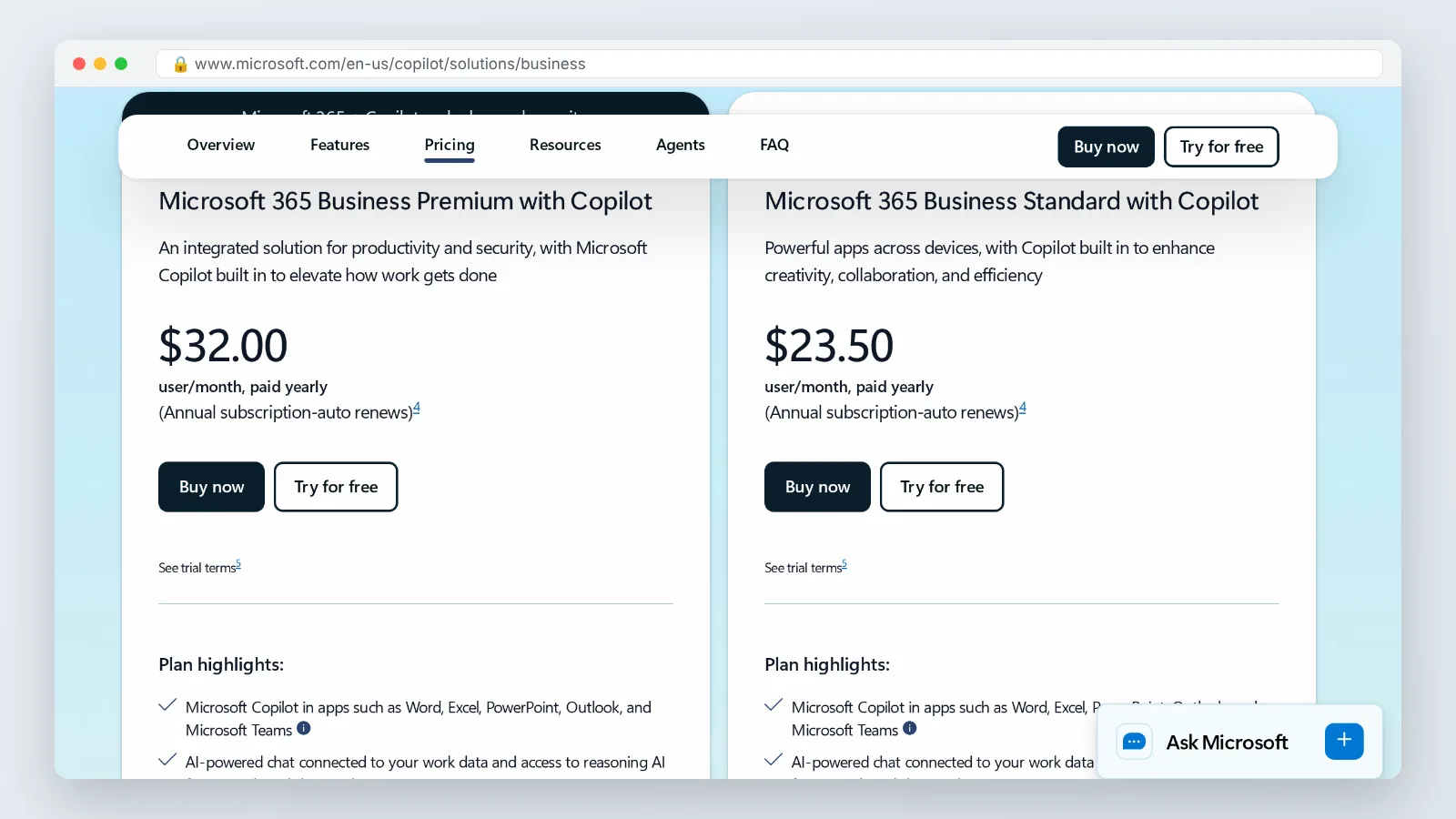
Microsoft now bundles Copilot into its business suites, listing Microsoft 365 Business Premium with Copilot at $32.00 per user/month on an annual subscription, according to Microsoft’s Copilot pricing page. Microsoft’s no-Teams variant of the same bundle, Microsoft 365 Business Standard with Copilot (no Teams), is listed at $20.30 per user/month paid yearly. Put the two Microsoft plan cards side by side: the per-user price line and the annual-commitment note under it are what decide the real cost of a seat.
Every price point above comes from the vendors’ own pricing pages — Notion’s pricing page and Microsoft’s two Copilot pricing pages, all checked in October 2026. These numbers move often, so re-check each page on the day you buy.
Three questions to settle with any vendor before purchase:
- Which seats actually need the AI tier, and which can stay on a cheaper plan?
- Does usage draw on a credit meter, and who gets alerted when it runs low?
- What happens to indexed content and agent history if you downgrade?
A reproducible 10-day pilot: connect sources, write 20 gold-standard questions, score the answers
Run the pilot with one team, not the whole company. Sales or support works best, because their questions repeat and have verifiable answers.
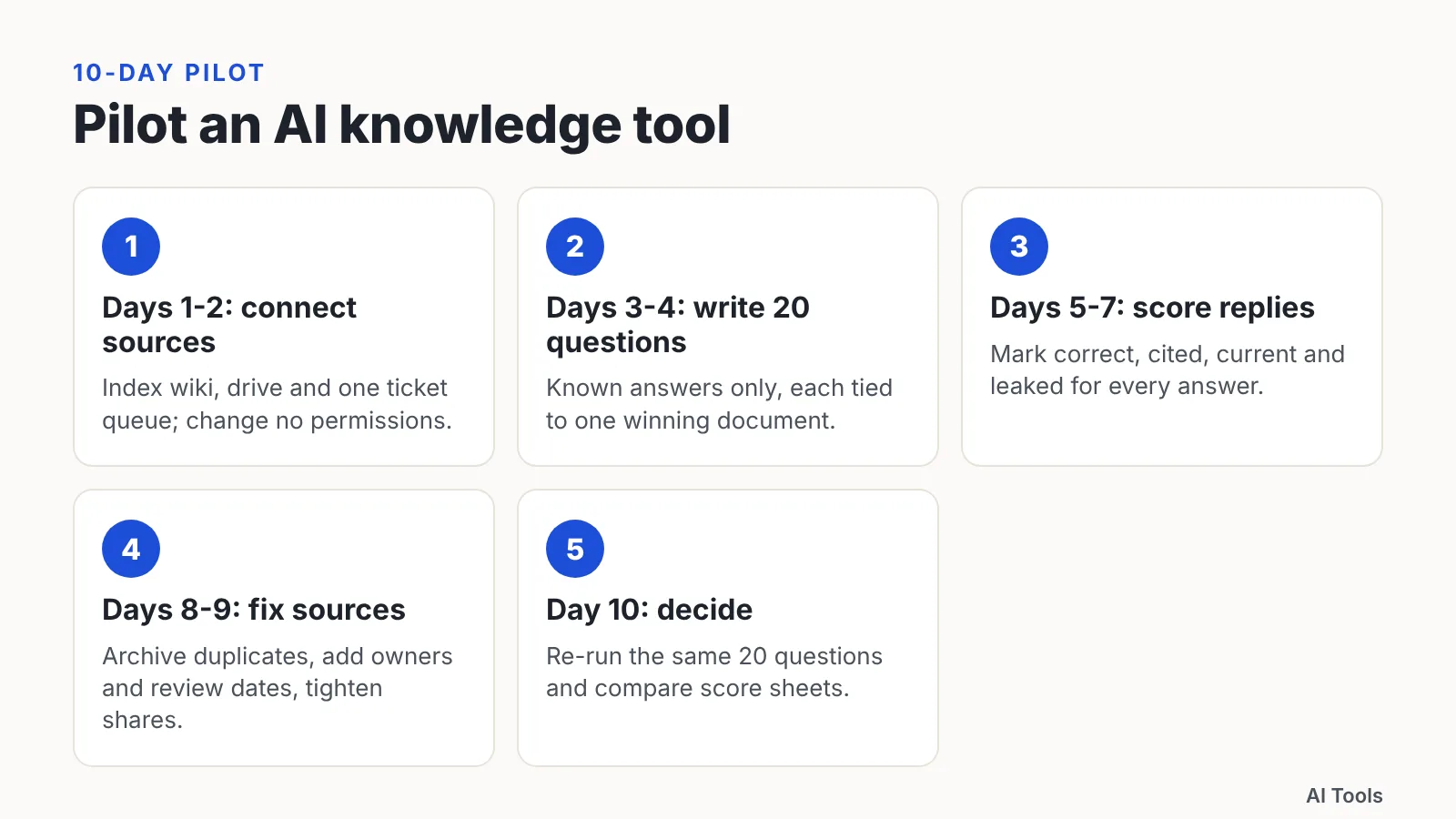
Days 1–2 — connect sources. Index the wiki, the shared drive folder that holds policies, and one ticket queue. Change no permissions yet; you want to see what the tool surfaces under current settings. Google’s NotebookLM caps each uploaded source at 500,000 words or 200MB and limits free users to 50 sources per notebook, per Google’s NotebookLM help pages (checked October 2026), so check ingestion ceilings before you plan the import.
Days 3–4 — write 20 gold-standard questions. Each question needs a known correct answer and one document that should win. Include two questions with no correct answer, to test refusal.
Days 5–7 — score every reply. Use four columns: correct, cited, current, and leaked. Mark leaked if the answer exposes content the asker should not see.
Days 8–9 — fix the sources. Archive duplicates, add an owner and a review date to every surviving policy page, and tighten over-shared files.
Day 10 — decide. Re-run the same 20 questions after cleanup and compare the two score sheets.
Where these tools still fail — stale docs, over-permissioned content, and the guardrails to set
AI search amplifies whatever your document store already is. A wiki full of contradictory drafts produces confident, contradictory answers at higher speed.
Stale content is failure number one. Most assistants default to relevance ranking unless you configure recency boosts, so a thorough page from two reorgs ago can beat the short, correct one written last month. Date-stamping and archiving fix more answer quality than any model upgrade.
Over-permissioned content is failure number two. A compensation spreadsheet shared with an entire department stays invisible in practice until a tool that respects those permissions starts quoting it to everyone with access.
Four guardrails worth setting on day one:
- Name an owner and a review date on every policy page; unowned pages get archived.
- Audit the folders your connectors reach before indexing, not after the first leak.
- Keep a short deny-list of sources — HR cases, legal holds, board material — out of the index.
- Require citations in the answer format, and tell staff to open the link before quoting a figure to a customer.
Frequently asked questions
Which AI knowledge tool should a 40-person team choose first?
Choose by document location. If the wiki is the system of record, Notion’s Business tier at $20 per seat/month carries full Notion AI, according to Notion’s pricing page (checked October 2026). If answers live in SharePoint, Outlook, or Jira tickets, a suite-native assistant inherits permissions you would otherwise rebuild by hand.
Do these tools respect existing file permissions?
Suite-native assistants mirror the permissions of the underlying system, which means they surface exactly what a user could already open — including over-shared files nobody remembers sharing. Audit folder access before indexing, and treat the first week of pilot answers as a permissions report.
Can you buy Atlassian Rovo on its own?
No. Atlassian states that Rovo has no standalone SKU. You reach it by holding a qualifying cloud plan — Standard, Premium, or Enterprise — on one of four products: Jira, Confluence, Jira Service Management, or the Teamwork Collection. The real decision is which Atlassian plan you hold.
How much content can NotebookLM handle in one notebook?
Google’s NotebookLM caps each uploaded source at 500,000 words or 200MB, and limits free users to 50 sources per notebook. Google’s help documentation also notes there is no page limit on uploaded documents — the binding constraints are the word count and file size.
How long until answers become trustworthy?
Expect the first score sheet to look worse than the demo, because your documents are the variable, not the model. After you archive duplicates and add owners and review dates during the 10-day pilot, the second run of the same 20 questions is where you should look for improvement.
Sources
- Notion Pricing Plans: Free, Plus, Business, & Enterprise
- Add or discover new sources for your notebook – NotebookLM Help
- Frequently asked questions – Gemini Notebook Help
- Rovo in Jira: AI features | Atlassian
- Microsoft Copilot Plans and Pricing—AI for Business
- Microsoft 365 Copilot Plans and Pricing—AI for Business (without Teams)
This article was drafted with AI assistance and published by the AI Tools Editorial Team after its facts were checked against the sources listed above.