The practical answer: ai tools for nonprofits should cost almost nothing. Claim free nonprofit tiers from Google and Canva, add one discounted assistant seat, and point it at three jobs — appeal emails, impact summaries, donor videos.
Quick steps
- Apply for Google Workspace for Nonprofits — it becomes your email, documents and research layer at no monthly cost.
- Claim Canva’s nonprofit offer so your appeal letterhead, social cards and video thumbnails stop eating design hours.
- Request nonprofit pricing from OpenAI before anyone on staff buys a retail seat on a personal card.
- Write a one-page AI policy naming what donor data may never be pasted, who reviews output, and when you disclose.
- Pick one deliverable this quarter — the year-end appeal email — and run it through the before/after workflow below.
What a tiny budget actually buys for a sub-$500k nonprofit
Your AI line item should be small enough to approve without a board conversation. For an organization under half a million dollars in annual revenue, the realistic shape is one paid assistant seat, two free nonprofit program tiers, and a free video tool you upgrade only if the year-end campaign works.
OpenAI’s nonprofit program prices ChatGPT Business Standard seats at $8 per user per month billed annually, or $10 per user per month billed monthly, according to the OpenAI Help Center.
| Layer | What a small nonprofit usually uses | Cost |
|---|---|---|
| Email, docs, research | Google Workspace for Nonprofits | $0 per month (Google) |
| Design and templates | Canva nonprofit program | Free for up to 50 users (Canva) |
| Writing and analysis assistant | ChatGPT Business, nonprofit pricing | $8 per user/month billed annually (OpenAI) |
| Donor video | Free tier of an AI video platform | $0 until you need length or brand controls |
Buy seats for the people who write, not for everyone. A development director and a program lead will use an assistant daily; a weekend volunteer will not.
Skip the mid-year CRM migration sold as an AI upgrade. The pattern that works is closer to the lean software stack a six-person startup team can actually run: few tools, each with a named owner, reviewed once a quarter.
Claim the free and discounted tiers before you spend anything
Eligibility paperwork is the real cost here. Have your determination letter, EIN and an organizational email address ready, because every program verifies you before it switches features on.
Google’s $0 per month Workspace for Nonprofits plan includes access to the Gemini app and NotebookLM, according to Google’s announcement on its company blog.
Canva gives registered nonprofits all Canva Pro premium features plus team collaboration tools free for up to 50 users, according to Canva’s nonprofit page.
Larger organizations have a second lever: nonprofits can negotiate up to a 75% discount on ChatGPT Enterprise by contacting OpenAI sales, per the OpenAI Help Center. That only matters if you need admin controls and shared workspaces across a bigger staff.
Check what you are standing on before you build. Microsoft announced on May 14, 2025 that it would stop donating Microsoft 365 Business Premium and Office 365 E1 licenses to nonprofits, according to TechSoup — if your file storage and email were running on donated licenses, confirm what you are now paying for and where your documents actually live.
Order of operations matters. Register for the free tiers first, run a month of real work on them, then pay for the one gap you can name out loud.
Example: a three-person animal rescue plans its year-end appeal
Example setup. Harbor Paws Rescue has an executive director, a part-time program manager and a weekend volunteer who posts to social. Their year-end appeal is the single largest revenue event of the year, and no new software was approved.
What they have: a donor export from their payment processor, a shared drive of program photos, last year’s appeal email, and a grant report due the same month.
What they lack: time between the fifteenth of November and the end of December, and anyone who edits video.
The plan is deliberately narrow — three deliverables, one owner each. The executive director owns the appeal email and the grant draft. The program manager owns the impact summary. The volunteer owns one short donor thank-you video.
Every AI step in this example produces a draft that a named human edits and sends. No tool touches the payment processor, and no donor names leave the spreadsheet.
Fundraising: the before and after for donor emails and a grant draft
Start by de-identifying the export. Delete names, emails and addresses; keep gift amount, first gift date, last gift date, campaign and channel. What you paste into an assistant should be a table of numbers, not a donor list.
Ask for four segments with a sentence of reasoning each: lapsed, recurring, first-time this year, and anyone who gave after a specific program post. Then ask for one appeal email per segment, each under two hundred words, same ask amount, different opening line.
| Step | Before, by hand | After, assistant-drafted |
|---|---|---|
| Segment the donor export | Most of a working day in a spreadsheet | A prompt, then a checking pass |
| Draft four segment emails | Two evenings of writing | One sitting, then line edits |
| Draft a grant narrative | A week of avoiding it | A full first draft the same afternoon |
Those are planning targets to aim at, not measured results — write down your own before-times first so you can tell whether anything improved.
For the grant draft, feed the assistant last year’s approved narrative, the funder’s current questions, and your de-identified program numbers. Ask it to flag every place where it does not have evidence, and fill those gaps yourself. A reviewer can smell a paragraph that no human verified.
Reports: messy program data into a funder-ready impact summary
The blocker is rarely writing. It is that attendance lives in one sheet, intake notes in a shared doc, and volunteer hours in someone’s email.
Put the source files in one folder, then use a research tool that reads your own documents rather than the open web. Ask three questions in order: what changed year over year, what the three strongest findings are, and what a funder would ask that these files cannot answer.
That third question is the one that saves you. It produces your data-collection fix for next year, which is worth more than the summary itself.
Keep the output structure fixed so reports become comparable: one paragraph of context, three findings with a number each, one honest limitation, one ask. Reuse that skeleton every quarter.
If your files are scattered across drives and inboxes, fix the filing before the writing — the approaches in this guide to organizing scattered team documents so AI can actually read them apply directly to a two-person program team.
Read every number in the draft against the source cell. An assistant will confidently round, re-label a column, or merge two categories that your funder defined separately.
Donor videos: a repeatable 90-minute script-to-share procedure
A year-end thank-you video does not need a crew. It needs a script, a face or an avatar, captions, and a deadline.
Minutes 0–20: script. Keep the first draft under 150 words — roughly a minute spoken. One beneficiary story, one number from your impact summary, one ask.
Minutes 20–35: source the visuals. Pull four program photos you own the rights to. Confirm releases for anyone recognizable.
Minutes 35–60: build the video. Either film the executive director on a phone against a plain wall, or generate a narrated avatar version. AI Studios can create videos from a script, a topic prompt, a web URL, uploaded documents or a product page, and its Docs to Video feature accepts .ppt, .pptx, .pdf, .doc, .docx, .xlsx and .txt files up to 20 MB — useful when your impact summary already exists as a deck. Text-to-speech voiceovers are available in 30+ languages on the AI Studios Free plan, which matters if your donors read in more than one language.
Minutes 60–75: captions and music. Most donors watch muted, so burn in captions. Choose a track you are licensed to use — the trade-offs in this roundup of royalty-safe music options for video are worth ten minutes.
Minutes 75–90: review and send. One staff member watches it end to end, checks the ask and the link, then it goes out.
Guardrails: donor data, disclosure, and the AI policy most nonprofits lack
Three-quarters of surveyed nonprofits have no AI strategy at all, according to The State of AI in Nonprofits 2025 from TechSoup and Tapp Network. Only 24% of nonprofits have a written AI policy in place, according to that same 2025 benchmark report.
Your policy fits on one page. Put these five lines in it:
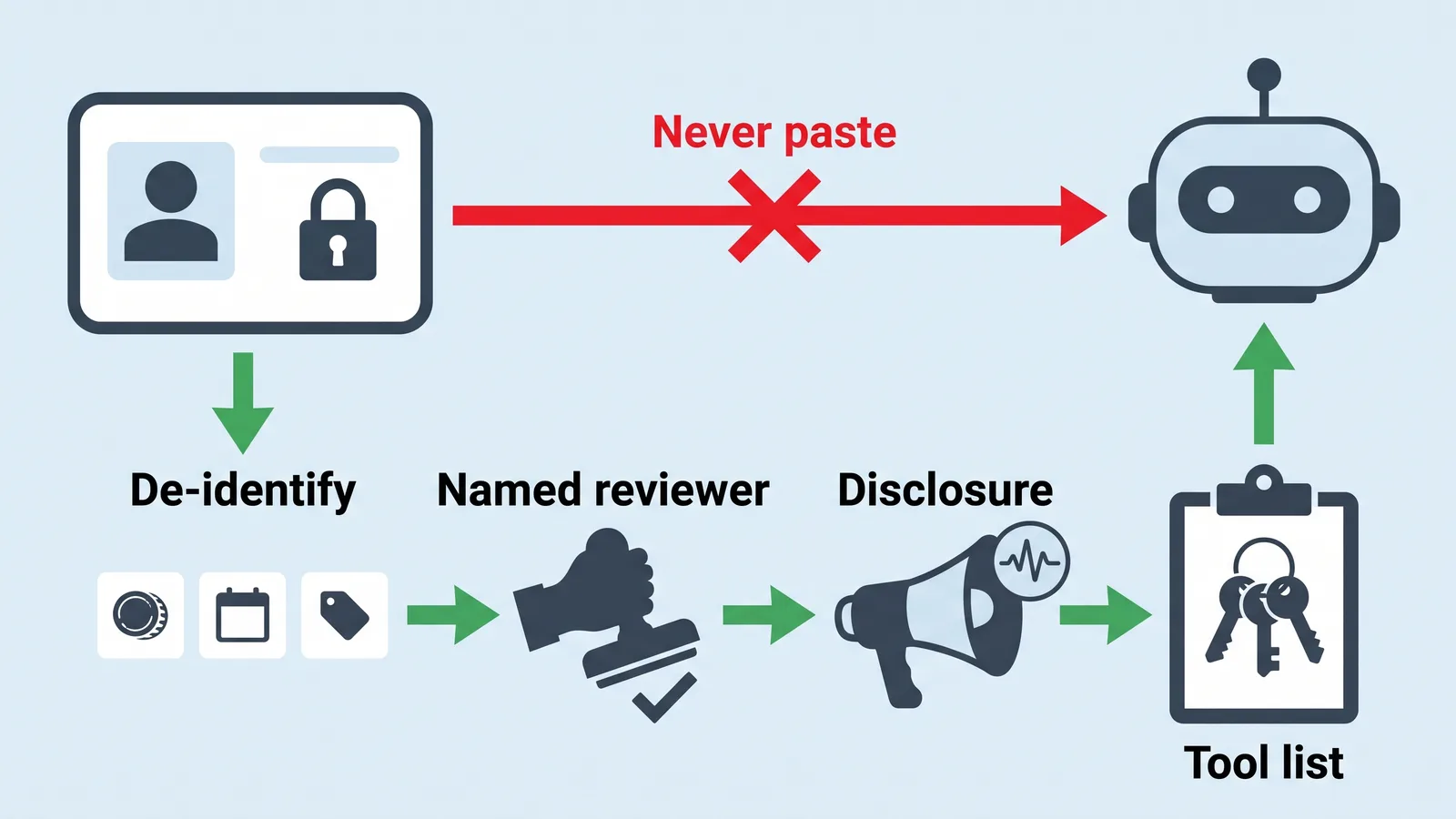
- Never paste donor names, emails, addresses, payment details or case notes into a general chatbot.
- De-identify first: amounts, dates and categories only.
- Named reviewer: every AI-assisted email, report or video gets a human approver before it leaves.
- Disclosure: state when a donor-facing video uses a synthetic voice or avatar, in plain language.
- Tool list: which tools are approved, who owns each account, and who cancels it.
Storage deserves the same care as prompts. Before you connect an assistant to your shared drive, work through what to check before giving an AI tool access to Google Drive, especially folder-level permissions.
Rules differ by jurisdiction: US state privacy and charitable-solicitation laws vary, and if you hold data on donors in the EU or UK, their data protection rules apply to you as well. This is general information, not legal advice — ask your counsel before you write donor consent language.
Your first 30 days and the three numbers to measure
TechSoup reports that just 12 percent of nonprofits consider themselves digitally mature, which means a modest, finished setup already puts you ahead of most peers.
Week 1. Submit nonprofit eligibility applications for Google and Canva. Inventory which licenses you currently pay for and which were donated.
Week 2. Request nonprofit pricing from OpenAI and buy seats only for people who write weekly. Create a single shared folder for program data.
Week 3. Draft the one-page AI policy, circulate it, and get the executive director to approve it in writing.
Week 4. Run one full cycle: segmented appeal draft, impact summary, and a single 90-second donor video.
Measure exactly three things, and record a baseline before you start:
- Hours to produce the quarterly report, counted door to door.
- Response rate on the appeal email, segment by segment.
- Video completion rate on the thank-you video.
If a tool does not move one of those three after a full cycle, cancel it. A small team can defend a stack of three tools to a board; it cannot defend eleven.
Frequently asked questions
What does an AI stack for a small nonprofit actually cost per month?
Close to nothing if you claim program tiers first. Google’s $0 per month Workspace for Nonprofits plan includes access to the Gemini app and NotebookLM, according to Google, and OpenAI’s nonprofit program prices ChatGPT Business Standard seats at $8 per user per month billed annually, according to the OpenAI Help Center. Buy seats only for staff who write weekly.
Can we paste donor data into ChatGPT or a similar assistant?
Not raw donor records. Strip names, emails, addresses and payment details, and keep only amounts, dates, campaigns and channels, so the assistant sees a table of numbers rather than people. Write that rule into policy: only 24% of nonprofits have a written AI policy in place, according to the 2025 TechSoup/Tapp Network benchmark report.
Do we have to tell donors that a video used an AI avatar or voice?
Disclosure expectations vary by jurisdiction, and US state rules differ from EU and UK data protection requirements, so check with counsel. As a practical standard, say plainly in the caption or on screen when the voice or presenter is synthetic — donors forgive the technology far more readily than the omission. This is general information, not legal advice.
What changed with Microsoft’s nonprofit license donations?
Microsoft announced on May 14, 2025 that it would stop donating Microsoft 365 Business Premium and Office 365 E1 licenses to nonprofits, according to TechSoup. If your email, file storage or document editing relied on those donated licenses, confirm what you now pay for and whether a free alternative covers the same work before your renewal date.
How long should a donor thank-you video take to produce?
Budget 90 minutes end to end using the procedure above: 20 minutes on a script under 150 words, 15 minutes sourcing owned photos, 25 minutes assembling, 15 minutes on captions and licensed music, and 15 minutes for one person to review and publish it.
Sources
- OpenAI for Nonprofits — OpenAI Help Center
- Canva Nonprofits — Free tools to power your mission
- New AI features coming to Workspace for Nonprofits — Google blog
- What Are Your Microsoft for Nonprofits Options in 2025? — TechSoup
- The State of AI in Nonprofits: 2025 (TechSoup / Tapp Network)
- AI for Nonprofits: Resources, Training, and Products — TechSoup
- 12 Revealing Nonprofit Stats From 2025 — NonProfit PRO
This article was drafted with AI assistance and published by the AI Tools Editorial Team after its facts were checked against the sources listed above.