Customer success teams use AI in three places: scoring account health from sentiment, engagement and support signals; monitoring onboarding milestones with human checkpoints; and drafting QBR decks from a data pull. Humans still set bands, call risk and send customer-facing messages.

What AI for customer success means in 2026 — and the three jobs it does well
Most CS teams don’t need an autonomous agent running their book. They need three chores done faster and more consistently: scoring accounts, watching onboarding slippage, and preparing reviews.
According to CX Today’s coverage of McKinsey’s 2025 State of AI survey, 88% of respondents said their organizations regularly use AI in at least one business function. Silicon Canals reports that McKinsey’s State of AI report was published on 5 November 2025 and is based on 1,993 respondents across 105 countries. Wide adoption, narrow competence — that gap is where CS planning should start.
Here is the honest split of labor:
| Job | What AI does well | What stays human |
|---|---|---|
| Health scores | Reads sentiment, engagement, response time and open support items continuously | Setting the red/yellow/green cut-offs and deciding what a red account means |
| Onboarding | Watches milestone dates, flags stalls, drafts nudge copy | Running the kickoff call, renegotiating scope, escalating to the sponsor |
| QBR prep | Pulls usage and support history, writes a first draft narrative | Choosing the ask, the pricing stance, and the story the exec hears |
The three jobs share one trait. They are high-frequency, low-judgment, and currently done in spreadsheets at 7pm. That is the right starting set.
The scenario: 9 CSMs, 180 B2B accounts, flat renewals, no data engineer
Picture a Series B software company with a nine-person CS team covering 180 B2B accounts. Each CSM carries roughly 20 accounts. Renewals are flat, expansion is lumpy, and nobody on the team writes SQL.
The health score lives in a spreadsheet that one senior CSM updates every other Friday. It uses login counts and gut feel. Two churns last quarter were green in that sheet three weeks before the cancellation email landed.
Onboarding is a 60-day ramp documented in a template that every CSM edits locally. QBR prep eats most of a working day per account, which is why only the top 30 accounts get one.
Set your before/after targets explicitly before buying anything. For this team, the planning targets were: health score refresh from every 14 days to daily, onboarding stall detection from "noticed at day 45" to "flagged within 5 business days of a missed milestone," and QBR prep from a half-day to 30 minutes of CSM time. Those are targets you commit to, not vendor promises — write them on the project page and date them.
Use case 1 — AI health scores: signals, bands and the before/after workflow
The before workflow is a biweekly manual refresh with one owner and no audit trail. The after workflow is a continuous score with a named owner for the configuration, reviewed in a 20-minute weekly risk standup.
Gainsight Support documents that Staircase AI produces a real-time account health score built from sentiment, engagement, open items and response time signals, each measured on a 0–100 scale where 100 is best. Gainsight’s community documentation describes the out-of-the-box Staircase AI health score as composed of four components: sentiment, engagement, response time and open items from support.
Feed it the signals you can actually trust:
- Engagement — meeting cadence, email threads, multi-threading beyond one champion
- Sentiment — tone across support tickets and email replies, not survey scores alone
- Response time — how long the customer takes to answer you, which is an early churn tell
- Open items — unresolved support tickets and escalations aged past your SLA
- Commercials — renewal date proximity and any churn-risk flags already raised
Setting bands is your job, not the model’s. Gainsight Support notes that admins set the red/yellow/green cut-offs for AI health scores themselves through a Band Scores Configuration that applies across all Staircase AI score types.
Tune the weightings once you have a quarter of history. Gainsight’s Q2 2026 release notes for Staircase AI describe letting administrators tune how strongly renewal, churn-risk and churn-notification events move an account’s AI health score, instead of leaving those effects at system defaults. Start at defaults, change one weight at a time, and log each change with a date.
Use case 2 — Onboarding: a 60-day ramp turned into an AI-monitored milestone sequence
A 60-day ramp fails quietly. The customer goes dark at day 22, the CSM is busy, and nobody notices until the day-45 check-in.
Convert the template into dated milestones with owners on both sides. Kickoff, data import, admin training, first production workflow, first internal champion-led session, go-live review. Each one gets a target date, a detectable completion signal, and a human checkpoint.
Let the AI layer watch dates and signals, then draft the nudge. Keep three checkpoints strictly human: the kickoff call, the go-live review, and any conversation about scope or cost. Those are the moments where a wrong automated message costs you the renewal.
Onboarding content is the other bottleneck. Instead of one CSM re-recording the same admin-setup walkthrough every month, teams generate avatar-narrated versions from existing material — tools like AI Studios turn a script, a web URL or an uploaded PPT or PDF into a narrated video, with the Docs to Video flow accepting .ppt, .pptx, .pdf, .doc, .docx, .xlsx and .txt files up to 20 MB.
Measure the sequence, not the effort. Track milestone completion rate by day 30 and day 60, the number of stalls flagged, and how many flags led to a live conversation within two business days.
Use case 3 — QBR prep: a reproducible 30-minute procedure
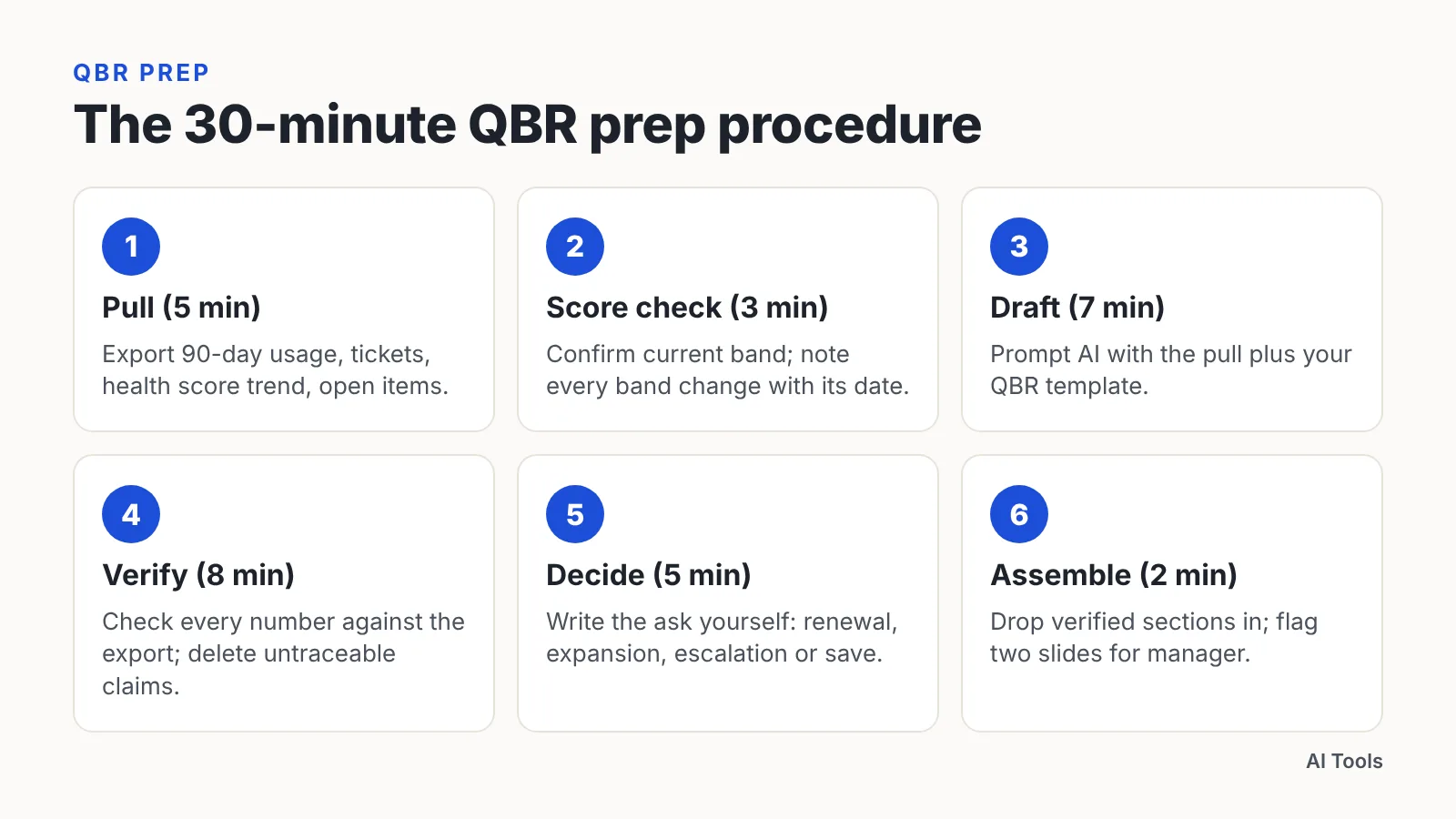
Run the same six steps every time, in this order:
- Pull (5 min). Export the account’s last-90-day usage, support ticket history, health score trend and open items into one workspace.
- Score check (3 min). Confirm the current health band and note every band change in the period with its date.
- Draft (7 min). Prompt the AI with the pull plus your QBR template, asking for an outcomes narrative: what the customer set out to do, what happened, what is blocking.
- Verify (8 min). Check every number in the draft against the source export. Delete anything you cannot trace to a row.
- Decide (5 min). Write the ask yourself — renewal, expansion, exec escalation, or a save plan. AI does not pick this.
- Assemble (2 min). Drop verified sections into the deck template and flag two slides for your manager’s review.
Portfolio-level prep works the same way. Gainsight Support describes a Staircase AI executive dashboard that can display revenue (or account count) broken down by current health score across active customers — useful for the board slide that precedes individual account reviews.
The verify step is non-negotiable. Teams that skip it ship a deck with a confident wrong number, and the customer’s ops lead finds it in the first five minutes.
Choosing the stack: CSP-native AI versus bolt-on copilots
Two paths, different failure modes:
| Option | Best fit | Main trade-off |
|---|---|---|
| CSP-native AI (Gainsight, ChurnZero, Vitally, Planhat) | Teams that already have a CS platform and clean account data | Scoring logic is tied to that vendor’s model and data pipes |
| Bolt-on copilots and note-takers | Teams without a CSP, or that want call summaries fast | Signals stay siloed; no single account health record |
Pricing transparency is poor in this category. Software Advice lists Vitally’s entry-level Basic plan at a starting price of $299.00 per month, one of the few published price points in a largely quote-only CS platform market. Budget for implementation time on top of license cost, especially with no data engineer on staff.
For the nine-person team in this scenario, the practical sequence is: fix the data model first, turn on native AI scoring second, add a note-taker third. Reversing that order gives you excellent call summaries attached to a health score nobody believes.
Ask every vendor three questions in the demo. Who sets the score bands? Which systems must be connected before the score is meaningful? What happens to the score when a key integration breaks for a week?
Guardrails: permissions, hallucination checks, and what AI never sends
Scope what the AI can read before you scope what it can write. ChurnZero’s AI Knowledge Sources feature gives admins source-level control over which internal spaces, articles or documents its AI agents are allowed to reference — that kind of control is the baseline requirement, not a nice extra.
Run a standing hallucination check. Pick five AI-drafted artifacts each month, trace every number and claim to a source row, and log the error rate in the same place you log score changes.
Never let AI send these without a human:
- Anything referencing contract terms, pricing or renewal dates
- Risk or escalation language to an executive sponsor
- Outage, security or incident communications
- Commitments about roadmap or delivery timelines
- Any message to an account already in a save plan
Permissions drift. Re-audit which knowledge sources each agent can reach every quarter, and whenever someone connects a new drive or workspace.
Measuring it: the 90-day scorecard
Activity metrics flatter AI projects. A scorecard that only counts drafts generated tells you nothing about retention.
CX Today reports that McKinsey classifies only about 6% of respondents as "AI high performers" that report significant value and attribute more than 5% of EBIT to AI. The distance between using AI and getting paid for it is measurement discipline.
Track six lines for 90 days, with a baseline recorded on day zero:
| Metric | Why it matters |
|---|---|
| Gross revenue retention | The outcome the whole workflow exists to move |
| Red-account early warning lead time | Days between first red flag and the churn conversation |
| Day-60 onboarding milestone completion rate | Whether the monitored sequence actually changed ramp |
| QBR coverage | Share of accounts receiving a review, not just the top tier |
| CSM hours per QBR | The efficiency claim, measured honestly |
| Draft correction rate | Share of AI drafts needing a factual fix before sending |
Review the scorecard at day 30, 60 and 90 with the same six lines. If GRR is flat but correction rate is falling and QBR coverage is up, you have a working system that needs another quarter. If only activity moved, pause and fix the data model.
Frequently asked questions
Which signals should feed an AI health score?
Start with the four components Gainsight documents for its out-of-the-box Staircase AI health score: sentiment, engagement, response time and open support items. Add renewal proximity and existing churn-risk flags once you have a quarter of history to compare against actual outcomes.
Who decides the red, yellow and green cut-offs?
You do. Gainsight Support notes that admins set the red/yellow/green cut-offs for AI health scores themselves through a Band Scores Configuration that applies across all Staircase AI score types, so bands reflect your renewal reality rather than a vendor default.
Can AI write and send customer-facing QBR decks?
It can draft them; it should not send them. Keep a verify step where every figure is traced back to a source export, and keep pricing, contract terms, risk escalations and incident communications under human control at all times.
Do we need a data engineer to run AI health scores?
Not necessarily, but you need a named configuration owner who maintains integrations, logs weighting changes and audits the score monthly. Gainsight’s Q2 2026 release notes describe admins tuning how strongly renewal and churn-risk events move an account’s AI health score.
How much should a small CS team budget for this?
Pricing is mostly quote-only in this category. Software Advice lists Vitally’s entry-level Basic plan at a starting price of $299.00 per month, and you should budget separately for implementation time, integration cleanup and the first quarter of score tuning.
Sources
- Staircase AI Health Score — Gainsight Support
- Staircase AI Health Score Components: Framework and Best Practices — Gainsight Communities
- Q2 2026 Release Notes for Staircase AI — Gainsight Support
- Explore Staircase AI in Gainsight CS — Gainsight Support
- AI Knowledge Sources: Business context for AI Agents — ChurnZero
- McKinsey’s State Of AI: The Scaling Gap Is Now CX’s Problem — CX Today
- McKinsey’s 2025 global AI survey — Silicon Canals
- Vitally Software Reviews, Demo & Pricing — Software Advice
This article was drafted with AI assistance and published by the AI Tools Editorial Team after its facts were checked against the sources listed above.