A CRM hub as the single contact record, an AI writing layer for drafts, an AI support agent billed per resolution, and automation glue between them — four layers, one owner each, no new headcount.

Three jobs, one small team: what an AI stack has to cover at seed stage
At seed stage you are not staffing departments. You are covering three jobs that each used to need a full-time person: getting attention, following up on pipeline, and answering customers who already paid. One hire can hold two of them for a quarter. None can hold all three past the first real traffic spike.
A stack that survives that pressure passes four tests:
- One contact record. Marketing, sales and support read and write to the same object, or you reconcile spreadsheets at midnight.
- Drafts, not decisions. AI produces first versions; a human approves anything a customer sees that carries a price or a promise.
- Visible handoff. Every automated conversation has a documented route to a person, and that person can see what the bot already said.
- Reversible. You can downgrade or cancel any layer within a month without losing the data inside it.
Free tiers break the first test faster than founders expect. HubSpot’s free CRM allows 10 custom properties and 1,000 total contacts, versus 1,000 custom properties on Starter, according to HubSpot’s Starter page for startups and small businesses. Ten properties is roughly lifecycle stage, source, plan, trial end date — and then you are out of room on the field that your routing rules actually need.
The scenario: Northpeak, a 6-person B2B SaaS startup with one marketer, one AE and no support hire
Northpeak is a composite example built for this article, not a customer case study. It sells compliance reporting software to mid-market operations teams. Headcount: two founders, two engineers, one marketer named Dana, one account executive named Marcus.
Support has no owner. Tickets land in a shared inbox, and the CTO answers them between pull requests, usually after dinner.
The weekly rhythm before any AI tooling, stated here as planning assumptions for the scenario: around forty trial signups, fifteen inbound support conversations, one webinar a month, and a newsletter Dana writes on Thursday nights. Marcus runs deals from memory and copies call notes into the CRM on Friday, sometimes.
Three failure points repeat:
- Trial signups sit untouched for two or three days because nobody owns the first touch.
- Support answers vary by whoever replies, since no written source of truth exists.
- The content calendar collapses whenever a launch needs Dana for a week.
That is the real problem statement. Not "do more marketing" — cover three jobs with one and a half people, without hiring.
The four-layer stack: CRM hub, AI writing layer, AI support agent, automation glue
| Layer | Job it does | Owner at Northpeak |
|---|---|---|
| CRM hub | Single contact record, forms, lifecycle stages, email sends | Dana |
| AI writing layer | First drafts of emails, posts, help docs, video scripts | Dana and Marcus |
| AI support agent | Answers repeat questions from your help content, routes the rest | CTO, part-time |
| Automation glue | Moves data between tools, fires alerts, logs activity | Marcus |
The CRM is the hub because it owns the contact record; every other tool is a spoke. Choose it first, then only add tools that write back to it.
The support layer is what changes the arithmetic at seed stage. Intercom’s Fin AI Agent is billed on outcomes at $0.99 per resolution, according to Voiceflow’s 2026 Intercom pricing guide, so support cost scales with tickets deflected rather than headcount. A single-vendor alternative keeps the desk inside the CRM: HubSpot’s Starter Customer Service Hub plan starts at $15 per month per seat when paid monthly, according to Forbes Advisor’s 2026 HubSpot pricing guide.
The writing layer is wider than a chat window. It covers subject lines, nurture sequences, onboarding scripts and repurposing — tools such as AI Studios turn a published web page into a narrated avatar video, which gives a one-marketer team a second channel without scheduling a camera day. Keep the glue layer boring: scheduled syncs, Slack alerts, and a form-to-CRM handoff you can explain in one sentence.
Before and after: one week of marketing, sales and support work, rebuilt
The table below is a planning model for the Northpeak scenario, not measured results from a live deployment. Build your own version before you buy anything, using your real hours.
| Weekly task | Before | After the four layers |
|---|---|---|
| Newsletter plus two social posts | 6 hrs, Dana writing from blank | 2 hrs editing AI drafts |
| Trial follow-up emails | 3 hrs, Marcus, manual sends | 0.5 hr reviewing one sequence |
| Support replies, 15 conversations | 5 hrs, CTO, evenings | 1.5 hrs on escalations only |
| CRM data entry | 2 hrs, Friday catch-up | Captured at form and call |
| Lead routing and alerts | Ad hoc, often missed | Instant, rule-based |
The shape of the change matters more than any single row. Dana moves from producing to editing. Marcus stops being a data-entry clerk and puts the recovered hours into live calls, while the CTO only opens conversations a human has to own.
Two risks arrive with that shift. Review time is real work and has to sit on someone’s calendar, or half-checked drafts reach customers. Deflected tickets can also hide product bugs, so read full transcripts weekly even for conversations the agent resolved cleanly.
Build it in five days: a reproducible setup procedure with checkpoints
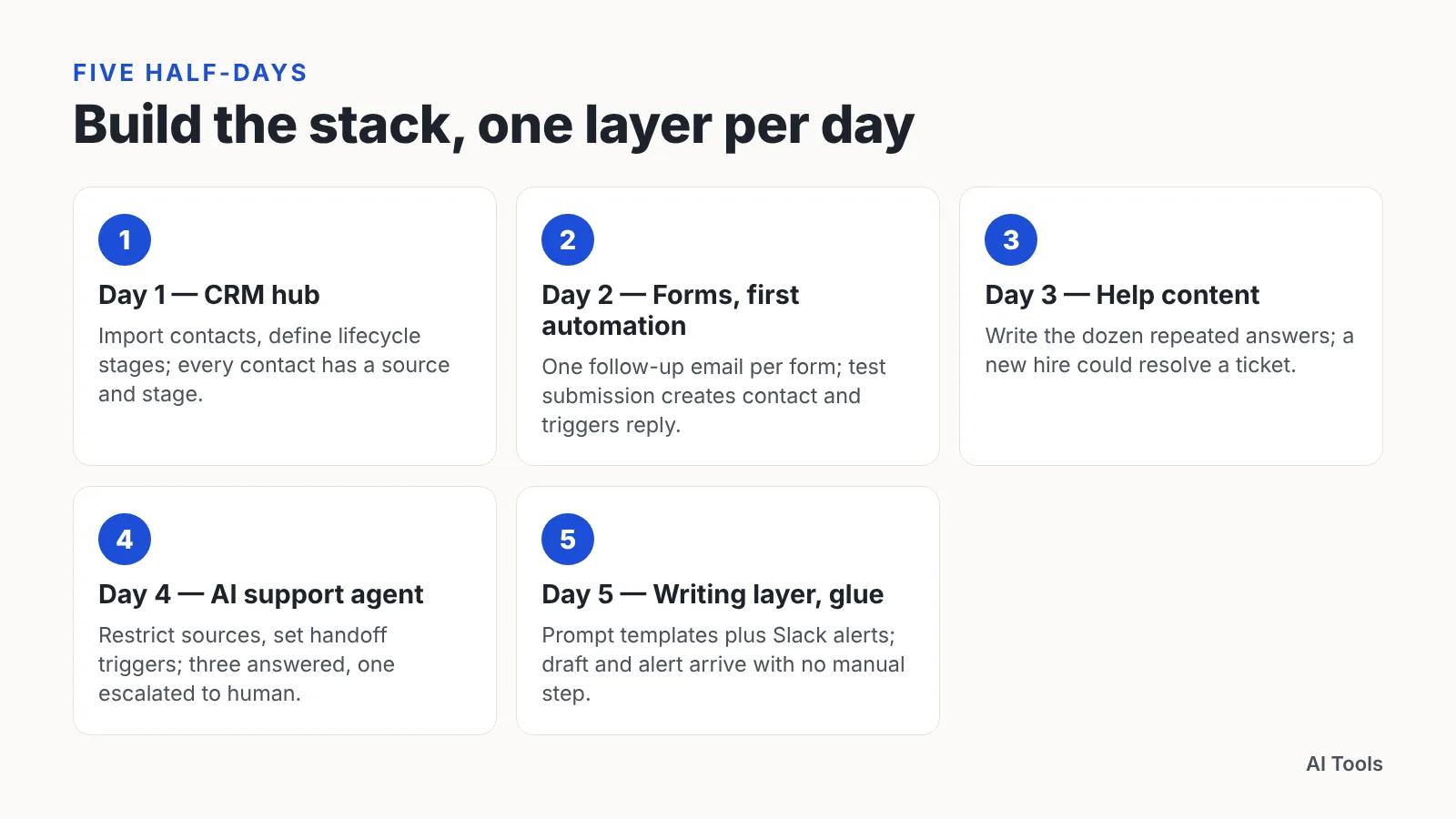
Run this as five half-days, one layer at a time, each with a checkpoint you are allowed to fail.
Day 1 — CRM hub. Import contacts, define lifecycle stages, and create only the custom properties you actually filter or route on. Checkpoint: every contact has a source and a stage.
Day 2 — Forms and the first automation. Connect site forms, set one follow-up email per form, confirm it logs to the record. HubSpot’s free tier caps marketing automation at 1 automated action per email and 1 automated email per form, while Starter unlocks form, email, ticket, project and ad automation, according to HubSpot — so make the pay-or-stay decision here. Checkpoint: a test submission creates a contact and triggers a reply.
Day 3 — Help content before the bot. Write the dozen answers your team repeats most, in plain language, one screenshot each. Checkpoint: a new hire could resolve a ticket using those pages alone.
Day 4 — AI support agent. Point the agent at that content, restrict it to those sources, and set hard handoff triggers for billing, cancellations and angry language. Checkpoint: three test questions answered correctly and one escalated to a human.
Day 5 — Writing layer and glue. Build prompt templates holding your positioning, tone and banned claims, then wire alerts into Slack. Checkpoint: a draft email and an alert both arrive with no manual step.
What it really costs: seat prices, usage limits and the upgrade cliffs to plan for
Seat price is the number you see on the pricing page. Usage limits are the number that actually bills you in month four.
- CRM and marketing bundle. The Starter Customer Platform bundle includes Marketing Hub Starter with 1,000 marketing contacts and 500 HubSpot Credits, according to HubSpot’s Customer Platform pricing page.
- List growth. On HubSpot Marketing Hub Starter, contacts above the included 1,000 are sold in bundles of 1,000 for $37.50 per month, which is the main variable cost as a startup’s list grows, according to Forbes Advisor’s 2026 HubSpot pricing guide.
- Support seats. Intercom’s entry Essential seat is $29/seat/mo on annual billing or $39/seat/mo monthly, and the Fin AI Copilot for human agents adds $29/agent/mo, according to Voiceflow’s 2026 Intercom pricing guide.
- Resolution billing. At $0.99 per resolution per Voiceflow’s guide, a month of deflected conversations is a line item you can forecast straight from ticket volume.
Plan for the cliff before you reach it. The jump from HubSpot’s Starter to Professional Customer Platform is a hard cost cliff: Professional starts at $1,300 per month with 2,000 marketing contacts, according to Tech.co’s 2026 HubSpot pricing guide. Write the trigger down now — which feature, at what revenue — so the upgrade becomes a decision instead of a surprise invoice. Scrub the list monthly, because you pay for contacts who never open anything.

Guardrails: data hygiene, review gates and when a human must take the conversation
Bad data degrades every AI layer above it, quietly. Standardize fields at entry — country, company size, plan — with dropdowns rather than free text. Delete duplicates weekly while the list is still small enough to fix by hand.
Review gates, by risk level:
| Output | Gate |
|---|---|
| Social post, internal summary | AI drafts, author publishes |
| Customer email, nurture sequence | Human edit before every send |
| Pricing, contracts, security answers | Human writes, AI only formats |
| Support reply on a known FAQ | Agent sends, human reads transcript later |
A human takes the conversation when any of these appear: a refund or cancellation request, a security or compliance question, a legal threat, a third failed answer in one thread, or explicit frustration. Build those as hard rules, not as model judgment.
Tell customers an AI agent is answering, and keep the route to a person one click away. Log what the agent said so the human taking over never asks the customer to repeat themselves. Check your own obligations on automated disclosure and personal data before launch — requirements differ by jurisdiction, and this is general information, not legal advice.
Measure or drop it: the metrics that decide which tools survive month three
Give every layer one primary metric and one kill criterion before the card goes in. Review both at day 90, on a calendar invite nobody can quietly delete.
| Layer | Primary metric | Drop it if |
|---|---|---|
| CRM hub | Share of contacts with source and stage filled | The team works around it in spreadsheets |
| AI writing layer | Published pieces per week, edit time per piece | Editing takes as long as writing did |
| AI support agent | Resolution rate, escalation rate, satisfaction on resolved chats | Escalations climb or satisfaction slips |
| Automation glue | Manual data-entry hours removed | Silent failures surface days late |
Track cost per outcome instead of cost per seat. With Fin billed at $0.99 per resolution according to Voiceflow’s 2026 Intercom pricing guide, support spend maps directly onto deflected tickets, which makes the comparison against a part-time support hire a one-line calculation.
Two habits keep the review honest. Record a baseline week before you install anything, hours per task included. Re-run the identical count in month three using the same definitions, then cancel whatever failed its criterion — an unused tool costs more than its invoice, because someone keeps checking it.
Frequently asked questions
What does a minimal AI stack cost a six-person startup each month?
Budget three lines: a CRM bundle, support seats and usage. The Starter Customer Platform includes Marketing Hub Starter with 1,000 marketing contacts and 500 HubSpot Credits per HubSpot, Starter Customer Service Hub starts at $15 per seat monthly per Forbes Advisor, and Intercom’s Essential seat is $29/seat/mo annually or $39 monthly per Voiceflow.
Can we run the whole stack on free tiers for the first six months?
Only until automation or fields run out. HubSpot’s free tier caps marketing automation at 1 automated action per email and 1 automated email per form, and the free CRM allows 10 custom properties and 1,000 total contacts, according to HubSpot — both limits bite as soon as you route leads by plan or source.
When does an AI support agent beat hiring a part-time support person?
Compare cost per resolved conversation against an hourly rate. Intercom’s Fin AI Agent is billed on outcomes at $0.99 per resolution according to Voiceflow’s 2026 pricing guide, so once your repeat questions are documented and deflectable, the agent handles volume spikes that a part-time hire cannot cover evenings or weekends.
Who should own the AI stack in a team this small?
One owner per layer, named in writing. The marketer owns the CRM hub and the writing layer, the account executive owns automation glue and routing rules, and whoever answers tickets owns the support agent, its help content and its escalation triggers.
How do we avoid getting trapped by a pricing upgrade later?
Write the upgrade trigger before you buy. The jump from HubSpot’s Starter to Professional Customer Platform is a hard cost cliff, with Professional starting at $1,300 per month with 2,000 marketing contacts according to Tech.co, so decide in advance which single missing feature justifies that step.
Sources
This article was drafted with AI assistance and published by the AI Tools Editorial Team after its facts were checked against the sources listed above.