Photoshop wins precise retouching, Photoroom wins background work at volume, and Topaz Photo AI wins upscaling. Canva Magic Studio suits fast social edits, Luminar Neo suits portrait and landscape finishing without layer-stack complexity.
How we compared, and what we could not verify
Three jobs decide most photo work: retouching faces and objects, cutting or replacing backgrounds, and upscaling small files for print or product pages. Each tool below was judged on those three, then on batch handling, price in a comparable unit, and export control. The ranking draws on vendor documentation and published reporting, not a hands-on lab run.
The axes used, in order of weight:
- Retouch control — can you mask, brush and undo a single edit without re-rendering the whole frame?
- Background work at volume — one-click cutouts, shadow generation, and an API for catalog runs.
- Upscaling — recovering detail in old scans, crops and low-resolution phone shots.
- Batch and automation — folder processing, presets, or a documented API.
- Price per comparable unit — per seat per month, per image, or per year, never a plan list.
- Export and ownership — RAW support, layered files, resolution caps.
According to Photoroom’s API pricing page, new accounts receive 10 free, watermark-free production calls on the Remove Background API before a paid plan is required, which makes a small pilot cheap to run yourself.
What this comparison could not verify: current list prices for Canva Magic Studio and Luminar Neo, model version numbers behind each vendor’s AI features, enterprise discounts, and output quality on your specific files. No identical test-image set was processed across all five tools here. Build your own: ten hard frames — backlit hair, a transparent bottle, a dark interior, a low-resolution archive scan — and run them through each trial before committing a team budget.
1. Adobe Photoshop
Photoshop remains the reference point for retouching you have to defend to a client. Layers, masks, frequency separation and selective healing let you fix one eyelid without touching the rest of the face. Generative Fill extends and repairs frames, but it is metered rather than unlimited.
Adobe’s Help Center states that most standard generative AI features in Creative Cloud, such as Generative Fill, consume 1 Adobe generative credit per generation. Budget accordingly: a retoucher who regenerates a sky eight times burns eight credits, not one.
Pricing moved recently. Digital Camera World reported that Adobe’s 20 GB Photography Plan containing both Lightroom and Photoshop rose from $9.99 to $14.99 per month for existing subscribers and closed to new ones. PetaPixel reported that Adobe’s Photography and Lightroom plan price changes took effect on January 15, 2025, applying immediately to new subscribers and to existing members at renewal.
Who it fits: a retoucher or art director who needs pixel-level control and layered PSD handoffs to a design team.
Skip it if: your actual job is 400 product cutouts a day. Photoshop is per-seat and manual by default, and scripting actions to match a cutout API is work you probably do not want to own.

2. Topaz Photo AI
Topaz is the specialist pick for resolution, noise and softness — the problems that no amount of masking fixes. It upscales crops, cleans high-ISO frames, and sharpens motion blur, running as a desktop app or as a plugin inside Photoshop and Lightroom. Processing happens on your machine, which matters if client files cannot leave the building.
Topaz Labs lists a monthly subscription for Topaz Photo AI at $35.00 per month on its own store. Topaz Labs also lists Gigapixel AI on subscription at $99.00 per year. Carried across twelve months, those two cited figures work out to $420 a year against $99 a year, so if enlargement is the only task you need, the narrower product is plainly the lighter commitment.
Flat software pricing changes the math against per-image billing. Once a studio processes archive batches week after week, a fixed monthly or annual fee stops scaling with volume while per-image API charges keep climbing.
Who it fits: photographers and archivists rescuing old scans, tight crops and low-light frames for print.
Skip it if: your bottleneck is background replacement or social-ready composites. Topaz does not build scenes; it repairs pixels, and asking it to do product staging will disappoint you.
3. Photoroom
Photoroom is built for catalog throughput rather than artistry. You send images, you get clean cutouts, AI backgrounds, shadows and relighting back, and the whole thing runs as an API your developer can call from a product information system rather than driving by hand on a desktop.
Photoroom states that its Remove Background API is priced at $0.02 per image, with monthly plans starting from $20. Photoroom also states that its Plus plans, which include the Image Editing API for AI backgrounds, shadows and relighting, cost $0.10 per image with monthly plans starting at $100.
Speed is the other argument, and it is the one claim here that arrives with a number attached. Photoroom states its Remove Background API processes up to 500 images per minute per user — size a seasonal catalog refresh against that stated throughput rather than against any implementation timeline, which this comparison cannot verify.
Who it fits: ecommerce and marketplace teams pushing hundreds or thousands of SKU images through a repeatable pipeline.
Skip it if: you need layer-level retouching of skin, jewelry or hair for editorial work. Photoroom positions cutouts and background work as the product it sells; a sympathetic portrait edit is not.

4. Canva Magic Studio
Canva’s AI editing lives inside the design tool your marketing team already opens every day. Background remover, object erase, generative edits and resizing sit next to templates, brand kits and shared folders, so a social post goes from raw photo to scheduled asset without a file ever landing on a desktop.
The real advantage is organizational, not technical. A founder, a contractor and a part-time social manager can all touch the same asset with the same brand colors, and nobody waits for a retoucher’s queue. Edits are non-destructive inside Canva, and approvals happen in comments rather than in email attachments.
Quality ceilings would show up on hard edges. Canva positions the suite as a design workspace with AI built in rather than a dedicated cutout engine, and fine hair, mesh fabric and glassware are where that difference would be expected to appear; no identical test set was run here, so read that as vendor positioning, not a measured result. There is also no RAW pipeline for color-critical print work.
Who it fits: small marketing teams producing social and ad creative at speed, with no retoucher on payroll.
Skip it if: you deliver print-resolution campaign imagery or need archival upscaling. Canva is a publishing tool with AI bolted on, not a darkroom.

5. Luminar Neo
Luminar Neo sits between a RAW editor and a one-click AI retoucher. Portrait tools handle skin, eyes and teeth with sliders instead of masks, sky replacement and relighting rescue flat landscapes, and the whole thing runs standalone or as a plugin alongside Lightroom.
The appeal is pace for photographers who shoot volume and hate layer stacks. Wedding and event shooters can apply a portrait preset across a set, then adjust individual frames, without building a single mask by hand. Skylum markets extensions that add noise reduction and upscaling for people who want one app rather than three; how far that coverage goes against a dedicated upscaler was not tested here.
The trade-off is precision and teamwork. Slider-driven AI gives you less control than a Photoshop mask when a client flags one specific blemish, and there is no shared workspace or documented pipeline for a team sending thousands of images through automation.
Who it fits: solo portrait and landscape photographers finishing sets quickly with consistent looks.
Skip it if: multiple people need to edit the same asset, or your workflow requires API automation. Luminar is a single-operator desktop tool.

Retouching vs backgrounds vs upscaling: where each tool wins
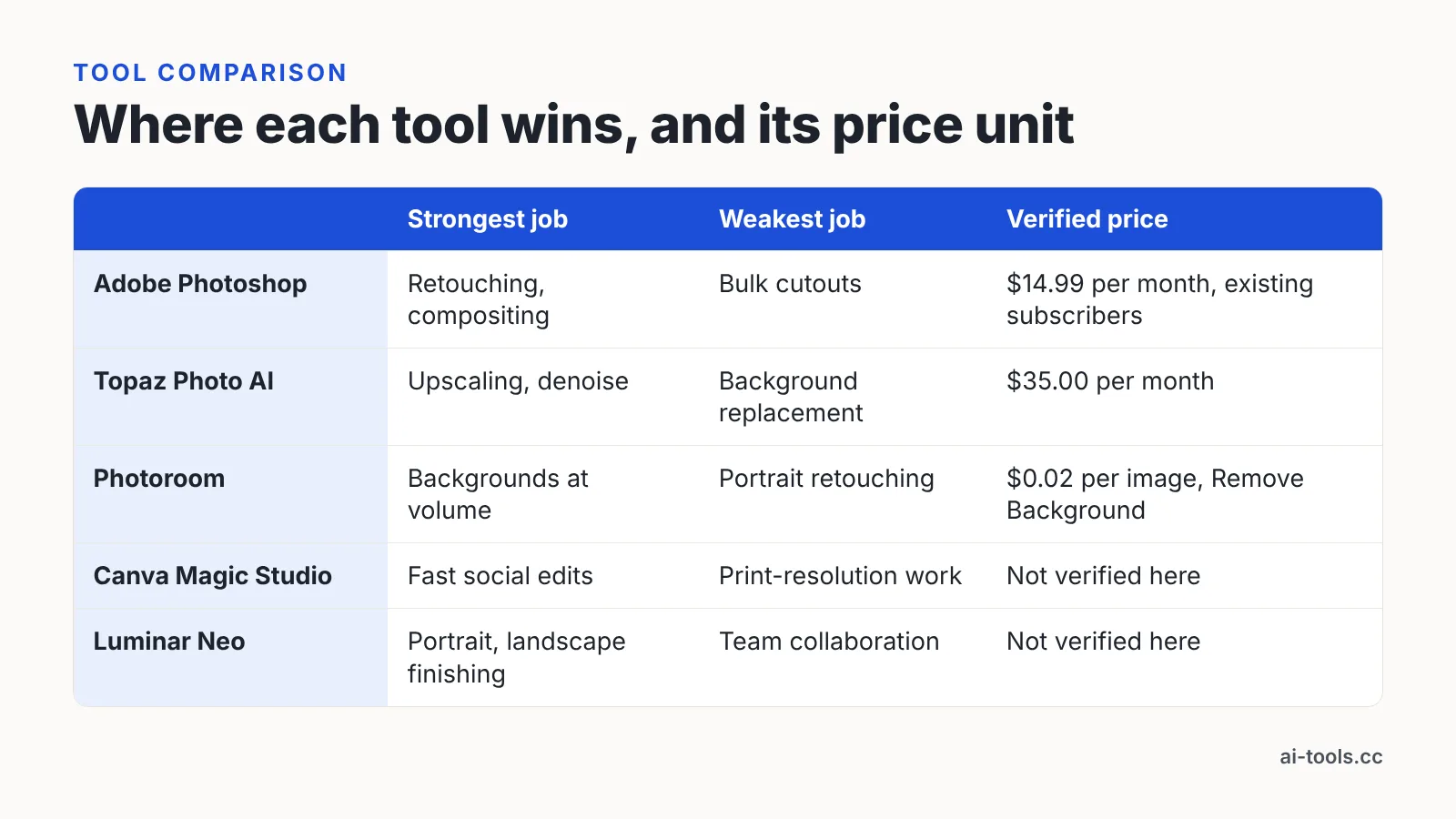
No single app leads all three jobs, which is why most working teams run two. Pair a precision editor with a volume cutout service, or pair a RAW finisher with a dedicated upscaler, and stop expecting one subscription to cover portraits and a full SKU catalog. Canva Magic Studio and Luminar Neo stay in the table without a verified price deliberately: current list pricing for either could not be confirmed, but neither role — in-workspace social editing, solo RAW finishing — is covered by the other three, so the gap is flagged rather than hidden.
| Tool | Strongest job | Weakest job | Verified price unit | Automation |
|---|---|---|---|---|
| Adobe Photoshop | Retouching, compositing | Bulk cutouts | $14.99 per month for the 20 GB Photography Plan with Lightroom (for existing subscribers; closed to new customers), per Digital Camera World; 1 generative credit per generation, per Adobe | Actions and scripts, manual setup |
| Topaz Photo AI | Upscaling, denoise | Background replacement | $35.00 per month, per Topaz Labs | Desktop batch folders |
| Photoroom | Backgrounds at volume | Portrait retouching | $0.02 per image for Remove Background, $0.10 per image for Image Editing, per Photoroom | Documented API, up to 500 images per minute per user, per Photoroom |
| Canva Magic Studio | Fast social edits | Print-resolution work | Not verified in this comparison | Shared workspace, templates |
| Luminar Neo | Portrait and landscape finishing | Team collaboration | Not verified in this comparison | Presets, batch on desktop |
Per-image pricing beats a seat when volume is spiky and seasonal; a flat seat or annual license wins when the same operator works every week. Photoroom states its Plus plans with the Image Editing API cost $0.10 per image, five times the $0.02 per image it states for Remove Background alone — so send only the frames that genuinely need generated shadows and relighting through the more expensive endpoint.
Which one fits you
Match the tool to the job you repeat most often, not to the most impressive demo you saw this year.
| Your situation | Pick | Why |
|---|---|---|
| Client retouching with layered deliverables | Adobe Photoshop | Mask-level control and PSD handoff; the cited $14.99 price covers existing subscribers only, so a new buyer will be on a different plan |
| Restoring archive scans or heavy crops | Topaz Photo AI | Local upscaling and denoise at a flat monthly fee |
| 500+ SKU images per catalog refresh | Photoroom | Per-image API pricing and documented throughput |
| Two-person marketing team, daily social assets | Canva Magic Studio | Edits and publishing in one shared workspace |
| Solo wedding or landscape photographer | Luminar Neo | Slider-driven portrait and sky work without layers |
| Print campaigns plus a large product catalog | Photoshop + Photoroom | Precision where it shows, automation where it scales |
Run a pilot before you commit a budget. Pick the ten hardest frames you own, process them in each trial, and compare them zoomed well past full screen on hair edges, fabric texture and shadow contact points — that is where AI editing fails first.
Watch the metered costs too. Adobe’s Help Center states that most standard generative features such as Generative Fill consume 1 generative credit per generation, so track how many regenerations your team actually needs per image before assuming a plan covers the month.
Frequently asked questions
Which AI tool removes backgrounds best for large product catalogs?
Photoroom, on the strength of its pipeline rather than artistry. Photoroom states its Remove Background API is priced at $0.02 per image with monthly plans starting from $20, and that it processes up to 500 images per minute per user, which suits seasonal catalog refreshes.
Does Photoshop charge extra for AI edits in 2026?
Generative features are metered by credits. Adobe’s Help Center states that most standard generative AI features such as Generative Fill consume 1 Adobe generative credit per generation, so every regeneration counts against your allowance, not just the final version you keep.
Is Topaz Photo AI worth it only for upscaling?
It depends on how narrow your need is. Topaz Labs lists Topaz Photo AI at $35.00 per month and Gigapixel AI on subscription at $99.00 per year, so if enlargement is the single task, the narrower annual product is the lighter commitment.
How much does Adobe’s Photoshop and Lightroom plan now cost?
Digital Camera World reported that Adobe’s 20 GB Photography Plan containing both Lightroom and Photoshop rose from $9.99 to $14.99 per month for existing subscribers and closed to new ones, and PetaPixel reported those changes took effect on January 15, 2025. A new customer will therefore be buying a different plan.
Can one tool handle retouching, backgrounds and upscaling together?
Rarely well. Precision retouching needs masks, catalog cutouts need an API, and upscaling needs a dedicated model, so most working teams pair two tools — commonly a layer-based editor plus a per-image background service billed separately.
Sources
- Gen AI features now available in Photoroom’s API, with up to 90% off for the Remove Background API — Photoroom
- Photoroom API: Pricing & Plans
- Creative Cloud Generative AI features — Adobe Help Center
- Adobe Is Ditching Its Cheapest Photography Plan for New Customers: Now What? — PetaPixel
- Adobe just quietly upped the cost of Lightroom and Photoshop for 2025 — Digital Camera World
- Subscription — Topaz Labs
This article was drafted with AI assistance and published by the AI Tools Editorial Team after its facts were checked against the sources listed above.