AI job search tools work best for targeting and checking, not writing: pull the exact keywords from each posting, rewrite every AI line in your own words, verify each number, then run a parse-and-match check before you send.

Quick steps
Four detailed steps follow, but this is the short version you can run on your next application tonight. The five short actions below collapse into those four detailed steps.
- Save one master resume holding every role, metric, tool and certification you can actually prove.
- Paste the job description into a general AI assistant and ask it to list the exact skill phrases, titles and tools the posting repeats.
- Tailor the master file against that list, then rewrite each bullet in your own voice and check every number against a payslip, dashboard, invoice or old report.
- Export a single-column file, paste it into a plain text editor to confirm it parses, and stop adding keywords the moment the text reads like padding.
- Decide what you will say if a form asks about AI assistance, then apply to a short list of roles you would genuinely accept.
The order matters. If you skip anything, in our view it should not be the rewrite pass in Step 2 or the parse-and-match check in Step 3 — those two do more to protect an application than avoiding chatbots altogether. Everything below explains what to check at each stage and where the real filtering risk sits.
The short answer: use AI to target and check, not to write
A machine usually reads your resume before a person does, and that machine is looking for evidence, not style. According to ResumeBuilder’s survey of US business leaders, 82% of companies said they use AI to review resumes, 40% use AI chatbots to talk to candidates and about 23% use AI to conduct interviews.
That changes what AI is useful for on your side of the process. Extraction, comparison and checking are safe. Full-paragraph generation is where applications die.
Hand these to AI:
- Pulling repeated skills, titles, tools and certifications out of a job description.
- Spotting gaps between a posting and your master resume.
- Catching parse-breaking formatting, date gaps and inconsistent tense.
- Drafting interview answers you then rewrite and rehearse out loud.
Keep these human:
- Any sentence describing what you personally did and what changed because of it.
- Every number: revenue, headcount, percentage lift, budget, timeline.
- The cover letter line that names something specific about the company.
- Assessment answers and live interview responses, unless the employer explicitly permits assistance.
The goal is a resume a recruiter believes and a parser can read. A beautifully written document that nobody can verify in a twenty-minute call is worse than a plain one you can defend line by line.
What to decide first: four tool types, their limits and costs
Pick your stack before you start applying, because each category fails in a different way. General-purpose AI writing help is cheaper than most dedicated job-search products: according to SSD Nodes’ ChatGPT price sheet, OpenAI’s consumer ChatGPT plans were $0 (Free), $8 (Go), $20 (Plus) and $100, $200 or $500 (Pro) per month as of 5 November 2026.
| Tool type | What it actually does | Main limit | Cost signal |
|---|---|---|---|
| General AI assistant | Extracts keywords, restructures bullets, runs mock interview questions | Invents metrics, employers and dates; produces a recognisable register | ChatGPT consumer plans: $0 Free, $8 Go, $20 Plus, $100/$200/$500 Pro per month (as of 5 November 2026) |
| Resume scanner / match-rate checker | Compares your text against one posting, flags missing phrases and parse errors | A score is not a hiring decision, and chasing it pushes you toward stuffing | Freemium; paid tiers vary by vendor |
| Auto-apply agent | Fills forms and submits applications in bulk | Volume without targeting; template floods are easy to spot; check each site’s terms before using one, as automated applying is not always permitted | Subscription, varies by vendor |
| Tracker or job board matcher | Holds your pipeline, deadlines, contacts and follow-up dates | Only as useful as what you log in it | A free spreadsheet covers most of it |
Most people need the first two and a tracker. Auto-apply agents are the category to approach carefully, since they optimise for the one metric that does not correlate with offers. For running your pipeline, a simple board you actually update beats a clever system you abandon in week two.
Step 1 — Build one master resume and pull the keyword list from the job description
What you need on hand: your last few performance reviews, any dashboard screenshots or reports you kept, invoices or project briefs, and your old resumes. These are your evidence files, and they decide which claims survive later.
Write the master document as one long, ugly, reverse-chronological file. Every role gets employer, title, location and month/year dates. Every bullet gets an action, an object and an outcome you can source.
Store it somewhere you can search months from now rather than in a folder of twelve near-identical drafts. If you plan to upload that file to an AI assistant, check the sharing settings first; this safe setup guide for Google Drive with an AI tool covers what access you are actually granting.
Now take the posting. A workable prompt: "From this job description, list the skills, tools, certifications and job titles it mentions, quoting the exact wording, and mark which ones appear more than once." Sort the output into three buckets — can prove, have but weak evidence, do not have.
The third bucket is the useful one. It tells you whether to apply at all, and it stops you from quietly inheriting a claim from an AI draft later.
Step 2 — Tailor with AI, then rewrite every claim in your own words
Tailoring means reordering and resurfacing what is already true, not generating new achievements. Ask the assistant to move the bullets that match bucket one to the top of each role and to flag posting requirements your resume never mentions.
Then rewrite. Forbes reported in 2024 that up to 80% of hiring managers throw out applications they believe were AI-generated, which makes untouched machine prose a filtering risk on its own.
A rewrite pass that works:
- Delete every adjective the model added — "spearheaded", "robust", "dynamic", "passionate".
- Put your own verb back, the one you would use describing the job to a friend.
- Open each number’s source file and confirm the figure, the period and the scope.
- Cut any line you could not expand on for two minutes in an interview.
That last rule catches the sneakiest failure: inflation you did not intend. A Kickresume survey of workers found 6% of Generation Z respondents admitted inflating job titles, dates or qualifications and 16% admitted exaggerating their impact, and AI rewriting makes that kind of drift effortless — a team’s result becomes yours, a six-month pilot becomes a year.
Example: a model turns "supported the migration of 400 accounts" into "led a company-wide migration." Both describe the same quarter. Only one survives a reference check.
Step 3 — Run a parse-and-match check and stop before keyword stuffing
Run your tailored file through a match checker, read the missing-keyword list, and add only the terms you can honestly claim. Jobscan tells users to aim for a 75% resume-to-job match rate but warns on the same page that going above 75% may require keyword stuffing.
Treat that ceiling as a stopping rule. Once you are adding phrases that make a sentence read oddly, you are optimising for a score and against the recruiter who reads it next.
Formatting fixes that matter more than the score:
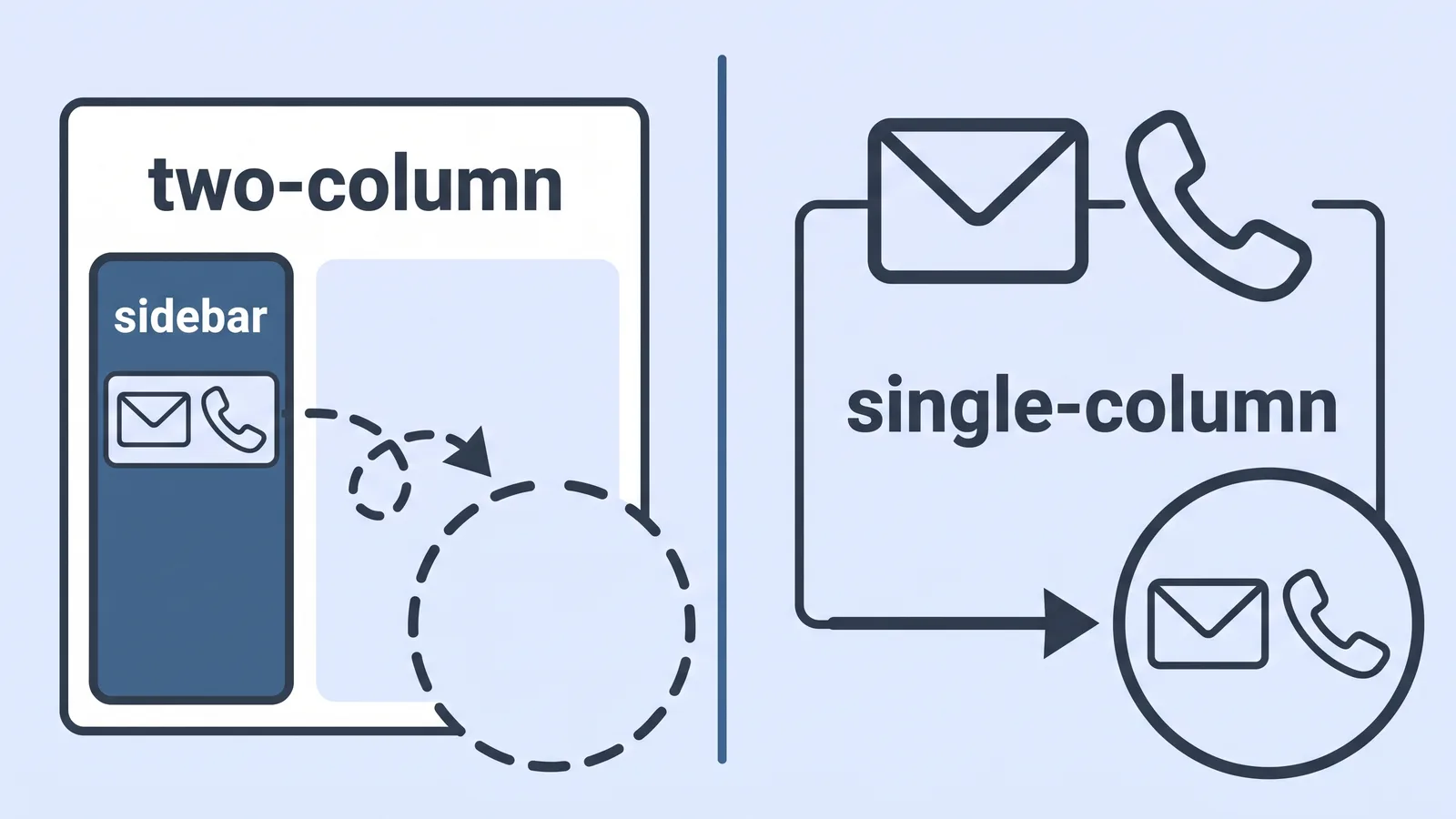
- One column. Sidebars and text boxes are a frequent reason contact details disappear.
- Contact details in the body, never in a header or footer.
- Standard section titles: Experience, Education, Skills, Certifications.
- Consistent dates in one format, such as Mar 2023 – Aug 2025.
- No icons, logos or images standing in for text.
- Both forms of every acronym at least once: Search Engine Optimization (SEO).
- Send the file type the posting asks for, and name it with your name and the role.
Skills sections should mirror the posting’s vocabulary without becoming a word list. If the job says "demand generation" and you wrote "lead gen", change it. If it says "Salesforce" and you have never opened Salesforce, leave it out and apply anyway.
Step 4 — Decide what to disclose, check your opt-out rights, apply at a human pace
Answer honestly if an application form asks whether you used AI assistance. Drafting support and grammar checks are a different thing from having a model complete a timed assessment for you, and the second will cost you the offer if it surfaces.
Rules governing the employer’s AI differ sharply by jurisdiction. New York City’s rules on automated employment decision tools require the employer to have a bias audit of the tool completed before it is used, according to the city’s Department of Consumer and Worker Protection FAQ. New York City’s Local Law 144 has required independent bias audits of automated employment decision tools used in hiring since July 5, 2023, as described in published research on automating that compliance work.
What you can do as a candidate:
- Read the notices on the application page and the posting footer before you submit.
- Ask the recruiter directly whether an automated tool screens the first round and whether an alternative process exists.
- Keep a copy of everything you submitted, in case you need to reference it.
Pace matters too. Twelve targeted applications with checked numbers and a specific cover line beat two hundred bot-submitted ones, because the second approach produces identical documents that recruiters recognise instantly. Cap your daily volume, log every submission with its date and contact, and set follow-up reminders.
This section is general information about US hiring rules, not legal advice; requirements vary by state and country, so check the rules that apply where you are applying.

How to verify your application actually parsed: the pre-send check
Do this before every submission, not once at the start of a search. ResumeBuilder reported that half of companies were already using AI somewhere in hiring and 68% expected to by the end of 2025, so assume your file is being read by software first.
Pre-send checklist
- ☐ Open your PDF, select all, copy, paste into a plain text editor — name, email, phone, titles and dates all present and in order.
- ☐ No garbled characters, no columns colliding, no missing section headings.
- ☐ Every number in the document traced to a file you still have.
- ☐ Each acronym appears spelled out once.
- ☐ Read three bullets aloud; if any sounds unlike you, rewrite it.
- ☐ Cover letter names something specific about this company, not the industry.
- ☐ File named with your name and the role title.
- ☐ Application logged in your tracker with the date and the recruiter’s name.
A common and expensive failure: the two-column template with contact details in a sidebar text box. The design looks sharp on screen, and the parser returns a record with no email address, so nobody can contact you and you never learn why. The paste-into-plain-text check catches it in seconds — if your phone number vanishes, rebuild the file as a single column and re-check before sending.
Frequently asked questions
Will using AI to write my resume get me rejected?
Using AI to extract keywords and check formatting is low risk. Submitting untouched model prose is not: Forbes reported in 2024 that up to 80% of hiring managers discard applications they believe were AI-generated, so rewrite every line in your own voice as described in Step 2.
Do employers really screen resumes with AI?
Widely, yes. ResumeBuilder reported that half of companies were already using AI somewhere in hiring and 68% expected to by the end of 2025, which is why parse-safe formatting and the posting’s exact vocabulary matter more than visual design.
What match-rate score should I aim for?
Jobscan tells users to aim for a 75% resume-to-job match rate and warns on the same page that pushing past 75% may require keyword stuffing. Treat that number as a stopping point, and add only terms you could discuss in an interview.
Are auto-apply bots worth paying for?
They optimise application volume, which is the metric least connected to offers. Recruiters recognise identical submissions quickly, you should check each job site’s terms before letting an agent apply for you, and the time saved is time you could spend verifying numbers and writing one specific cover letter line.
Can I ask an employer not to screen me with AI?
You can ask, and the answer depends on where you apply. New York City’s Local Law 144 has required independent bias audits of automated employment decision tools in hiring since July 5, 2023; rules differ elsewhere, so check the posting’s notices. This is general information, not legal advice.
Sources
- 7 in 10 Companies Will Use AI in the Hiring Process in 2025, Despite Most Saying It’s Biased — ResumeBuilder.com
- Job fraud — Wikipedia
- Automated Employment Decision Tools: Frequently Asked Questions — NYC Department of Consumer and Worker Protection
- What we learned while automating bias detection in AI hiring systems for compliance with NYC Local Law 144 (arXiv:2501.10371)
- Jobscan alternatives in 2026, and what a match rate misses — Four Leaf
- ChatGPT Price Sheet: Plans, API and Business — SSD Nodes
This article was drafted with AI assistance and published by the AI Tools Editorial Team after its facts were checked against the sources listed above.